Line-side supermarket replenishment works when a withdrawal leads to a refill before the production area runs out. A smart cabinet can make stock changes visible and flag a low balance, but someone still has to check reserve stock, prepare the right quantity, deliver it on the material route and confirm that it reached the correct bin. The most useful place to start is that handoff: who acts on the signal, and what counts as a completed refill?
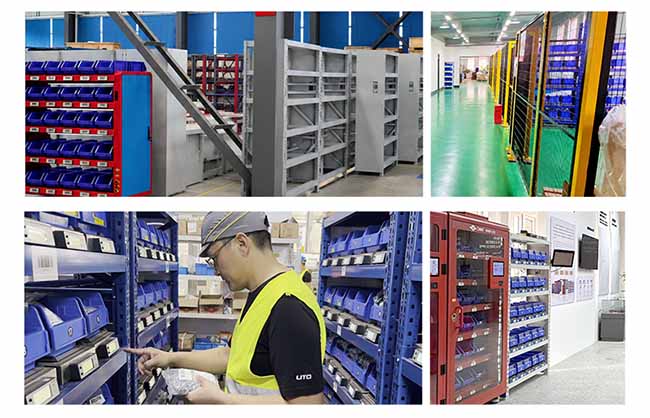
Line-Side Supermarket Replenishment with Smart Cabinets
Quick Answer
Use a smart cabinet to monitor suitable items in assigned bins and give the material handler a signal when stock needs attention. Set the threshold around the time it takes to refill the bin, including the wait for the next scheduled route. Keep the request open until material has been placed in the correct location and the receipt has been confirmed. Maintain a separate process for replenishing the upstream stock that feeds the line.
Key Takeaways
- Give every replenishment signal one owner, one destination and a clear completion rule.
- Set the low-stock threshold using actual consumption and the time until the next confirmed refill.
- Keep material staged for delivery separate from material available at the line.
- Use open picking for suitable routine items and apply managed access selectively.
- Test how the process handles reserve shortages, duplicate signals and interrupted transactions.
Contents
- Define the two replenishment loops
- Assign each handoff
- Set thresholds around the delivery route
- Choose which materials belong in a cabinet
- Handle exceptions and system records
- Pilot the full replenishment cycle
- Frequently asked questions
Define the Two Replenishment Loops
A lean supermarket holds a defined stock of materials at assigned locations so that downstream work can draw what it needs and signal replenishment. In a line-side application, it gives production operators a nearby supply of selected components. The Lean Enterprise Institute’s definition of a supermarket explains the link between a withdrawal and the signal sent back to the supplying process.
The line refill loop replaces stock taken from the line-side bin. It starts with use at the line and ends when the correct material arrives in the assigned location. Its supply source may be a central storeroom, a warehouse supermarket or another designated reserve.
The reserve replenishment loop keeps that supply source ready. It may involve stock transfers from another warehouse, production by an upstream process or procurement from a supplier. If a line-side alert and a warehouse shortage both concern the same fastener, they still call for different actions. The first asks how to restore stock at the line; the second asks how to restore the reserve.
Define both loops before changing the signal. A cabinet can flag that a line is short. The plant still needs an owner who can check the reserve and take action if there is nothing to deliver.
Assign Each Handoff in Line-Side Supermarket Replenishment
Consider an assembly cell that takes flange nuts from a dedicated bin throughout the shift. The cabinet flags a low balance. The route owner then needs the SKU, destination, amount to deliver and time by which the refill is needed. If the warehouse stages a pack beside the loading point, the material is still unavailable to the assembly cell. The refill is complete only after the pack reaches the right location and its contents are accounted for.
| Step | Typical Owner | What to Confirm |
|---|---|---|
| Review the signal | Material coordinator or route owner | Correct SKU and destination, urgency, and whether a request is already open. |
| Prepare the refill | Storeroom or warehouse picker | Reserve availability, issue unit, quantity and correct variant. |
| Deliver on the route | Material handler | Actual delivery to the assigned cabinet and bin. |
| Confirm and close | Designated refill owner | Quantity received, resulting stock balance and any discrepancy needing follow-up. |
These are process steps. Record them in the cabinet platform, a warehouse task queue or a route sheet, depending on the system and workflow confirmed for the site. If the same request appears on two screens, connect both records to one refill so that two teams do not deliver against the same shortage. Set a rule for partial refills: record what arrived and keep the remaining need visible.
Set Thresholds Around the Material Delivery Route
Calculate how much stock the line needs from the moment the signal appears until the refill actually reaches the bin. Include signal review, warehouse picking, staging, waiting for the route, travel and placement. If a signal arrives just after a scheduled departure or before a shift handover, the wait may be longer than the route’s driving time suggests.
As an illustration, if a line uses about 12 pieces per hour and a refill can take 2.5 hours to reach the bin, expected consumption during that interval is 30 pieces. If the team plans for another 10 pieces to cover observed variation, it can test a trigger of 40 pieces. If the line periodically takes a large batch at once, test how far the balance can fall when it crosses that trigger. These figures illustrate the calculation; the working threshold should come from the site's own demand and route data.
Set the refill quantity separately. If the storage limit is 100 pieces, the bin contains 34 at delivery and the storeroom issues only packs of 20, three packs bring the bin to 94. Four packs would exceed the planned limit. Define whether material handlers may split a pack and where the remainder goes. That decision affects both the physical fill and the inventory record.
Start with the regular material route and define when to expedite. For example, if the remaining quantity will cover the line until the next delivery, add the request to the route. If confirmed demand will exhaust the bin first, alert the designated owner. Repeated emergency trips for the same item are a reason to review the threshold, route interval or reserve availability.
Choose Which Materials Belong in a Cabinet
Start with stable, frequently used materials that operators pick from identifiable locations: standard fasteners, washers, clips or selected production consumables. Check each SKU against the actual bin and the smallest normal pick. Similar items should have separate, clearly labeled locations. If a bin cannot reliably distinguish the withdrawals that matter, consider a valid pack-level process or retain the existing visual method for that item.
The NVMI-H open smart cabinet offers direct picking from assigned bins, with weight sensing and low-stock alerts. It is an option for regular-use materials where open access suits the line. The NVMI-D enclosed smart cabinet adds configured identity verification and permissions for selected items that need managed access. NVMI-X is a mobile open option to assess when the supply point must move with the work area.
A supermarket can combine standard shelving, visual kanban and smart cabinets. Keep bulky packs on suitable shelving, use assigned smart bins where stock movement is useful, and manage restricted parts according to the site’s issue rules. Check the cabinet from both sides of the workflow: can operators pick without disrupting work, and can the material handler refill it efficiently on the scheduled route?
Handle Exceptions Before Connecting More Systems
A low-stock alert needs an action rule. If a cabinet signal is to serve as an electronic kanban, define who receives it, what quantity it authorizes and when the request closes. During a transition, a physical card and a digital alert may both be visible. Assign one of them as the trigger for a refill and use the other as a visual aid or fallback, with a clear rule for reconciliation.
- Reserve stock is short: Escalate to the warehouse or planning owner. Keep the line request open and report what can be delivered.
- A refill is staged but delayed: Keep it separate from available line stock. Tell the line supervisor if the next route cannot cover the need.
- The physical count differs from the record: Check the item, location and unit of measure. Record the correction and investigate recurring causes such as mixed items or incorrect pack conversions.
- Connectivity is interrupted: Use the agreed manual signal and receipt process. Reconcile outstanding requests and stock changes once records are available again.
Where a supplier supports the operation, agree on whether the service covers reserve stock, delivery to the line-side cabinet or both. Review smart cabinet configurations for VMI projects alongside the proposed refill responsibility and escalation process. If cabinet data will feed ERP, MES, WMS or supplier systems, confirm which events cross the interface and which system owns each transaction. An alert can inform a transfer or purchasing decision; automatic order creation requires a separately agreed and tested workflow.
Pilot the Full Replenishment Cycle
Start with one route and a manageable set of SKUs. Include a high-frequency part, an item normally issued in packs and a part that is difficult to source quickly if the reserve runs short. Observe the current process first so that you can compare how the same route operates after the cabinet is introduced.
- Map the signal, warehouse pick, delivery and receipt. Name the owner for each step across shifts.
- Verify the starting stock and match each SKU, pack unit and bin label to its record.
- Run normal refills and test a signal that appears just after the route departs.
- Simulate a partial delivery, unavailable reserve stock and a refill aimed at the wrong location.
- Compare confirmed refills with physical stock and review unresolved requests at shift handover.
Measure time from signal to confirmed refill, stockouts at the line and emergency trips outside the route. Review the results by SKU and shift so that averages do not hide a recurring problem. If the same item repeatedly needs an emergency delivery, check route timing and reserve stock before adjusting the sensor or buying a larger cabinet. For related planning topics, see the smart warehouse and inventory guides.
Frequently Asked Questions
Does a smart cabinet replace a line-side supermarket?
A cabinet can be one part of the supermarket. The supermarket still needs defined stock levels, assigned locations, a supply source and a delivery process. Standard shelving may remain appropriate for items that do not require connected measurement or managed access.
Can a low-stock alert replace a kanban card?
It can serve as the replenishment signal if the site defines who acts on it, what quantity to supply and how to close the request. Check how the process avoids duplicate refills and handles outages before removing the physical signal.
Should every SKU use the same low-stock threshold?
Use separate thresholds when demand, pack quantities or refill times differ. Even the same SKU can need different thresholds at two locations if one location has a longer wait for a refill.
What if the warehouse has stock but the line still runs out?
Check the timestamps for signal review, picking, staging, delivery and receipt. If stock was available upstream but missed the route, review the handoff or delivery interval before increasing the reserve quantity.
Can the system automatically place an order with a supplier?
A low-stock signal can support purchasing decisions. Automatic ordering depends on confirmed interfaces, business rules and approval procedures. Identify which system owns purchase orders and test the workflow before relying on it.
References & Sources
The Lean Enterprise Institute’s supermarket definition explains the underlying pull principle. NVMI product information describes the open, enclosed and mobile cabinet configurations. The threshold and refill examples above are planning illustrations.
Plan a Pilot Around One Material Route
To discuss line-side supermarket replenishment with NVMI, share your most frequently issued SKUs, pack sizes, storage locations and current issue process. Include the material route and delivery schedule, stockout frequency, recurring mix-ups or missing stock, and who replenishes each location. Add the number of users, access needs, proposed cabinet locations, system interfaces and the measures you want to track. With that information, you can define a pilot that tests whether each signal leads to a confirmed refill in time.