Cutting tool inventory management becomes difficult when inserts, drills, end mills and toolholders move between a central tool crib, CNC machines and work areas without a consistent issue process. A stock count may show that an item was purchased, yet the next shift cannot find the correct grade, diameter or usable replacement. Smart cabinets can bring selected tools closer to the point of use while making stock changes and replenishment needs easier to review.
Cutting Tool Inventory Management with Smart Cabinets
Quick Answer
A smart cabinet can support cutting tool inventory management by assigning suitable tools to identified storage locations, monitoring stock changes and highlighting low-stock items. An open cabinet may suit frequently used, readily available supplies. An enclosed or compartment cabinet may suit selected items that require managed access. The most important design decisions concern SKU detail, physical separation, issue units, returns and replenishment ownership. Cabinet inventory data should not be confused with machine tool-life data or treated as proof that a tool was used on a particular job.
Key Takeaways
- Classify tools by frequency of use, value, physical size and the level of issue control required.
- Keep cutting grade, geometry, dimensions and package quantity clear in the SKU record when those differences affect selection.
- Test weight sensing with the actual tool and packaging before deciding how stock will be counted.
- Define separate processes for new tools, tools in use, returns, reconditioning and scrap.
- Assign responsibility for low-stock alerts and verify that replacement tools can reach the machine when needed.
Why a Tool Crib Count May Not Match What Machinists Can Use
A cutting tool is only available to production when it is the right tool in usable condition and can be found in time. A broad inventory description such as “carbide insert” is inadequate if the machine needs a particular shape, size, grade and chipbreaker. Similarly, a drawer full of end mills does not answer whether the required diameter and configuration are available for the next job.
The problem often grows across shifts. A machinist may take a replacement insert from a shared box; a toolholder may be moved to another machine; a worn tool may be set aside for inspection rather than returned to available stock. If these movements are not distinguished, the recorded balance may look sufficient while the usable stock at the point of issue is low.
A cabinet helps with the portion of this problem that can be organized as physical inventory. Assigned locations and stock-change records make it easier to see what remains in the cabinet. The machining team still needs its own decisions about tool selection, condition, presetting and replacement. The two processes should exchange information where useful, but neither should be assumed to perform the other’s work.
Build an SKU Catalog That Prevents the Wrong Pick
Start with the tools that cause the most frequent trips to the tool crib or the most disruptive shortages. Ask programmers, setup personnel and machinists which differences matter when they choose an item. The catalog should make those differences visible to the person picking the tool, without creating several names for the same approved product.
For an insert, the record may need its manufacturer designation, geometry, grade, coating and package unit. For a drill or end mill, relevant fields may include diameter, length, cutting material, flute count and approved application. Toolholders and assemblies may require their own identification method because their issue and return cycle differs from that of disposable cutting edges. Use the actual manufacturer information and the site’s approved tooling list when setting up these fields.
Keep physical labels aligned with the catalog. Similar-looking insert boxes should occupy separate, clearly marked locations. If a supplier changes packaging or an approved substitute is introduced, update the record and check the effect on sensing before placing it in the same bin. A reliable location-to-SKU relationship is more useful than a large catalog whose physical storage is difficult to follow.
Which Cutting Tools Belong in a Smart Cabinet?
The first deployment does not need to cover the entire tool crib. Choose items whose storage and issue method suit the cabinet, then expand only after the process works in daily use.
| Tool group | Typical inventory need | Issue planning |
|---|---|---|
| Frequently used inserts | Keep the correct variant available near CNC work areas. | Separate similar SKUs and define whether stock is issued by insert, pack or another unit. |
| Drills and end mills | Find a specific size and configuration without a prolonged tool-crib search. | Check packaging, unit weight, bin fit and whether unused tools may be returned. |
| Higher-value cutters or special tools | Know when and through which process an item was issued. | Consider managed access and a documented return or exception process. |
| Toolholders and assemblies | Track availability across issue, use and return. | Confirm physical fit and decide whether individual identification is needed beyond a cabinet stock count. |
| Tools awaiting inspection or reconditioning | Prevent non-ready items from appearing as available replacements. | Use a separate status and location; define who approves their return to service. |
These are workflow examples, not a claim that every item fits a standard cabinet bin. Check tool dimensions, weight, protective packaging and handling requirements against the proposed storage configuration.
How Cutting Tool Inventory Management Uses Stock-Change Data
NVMI smart cabinets use weight-sensing units to detect changes as materials are removed or added. For a cutting tool, the practical question is how that measured change becomes a trustworthy inventory quantity. A packaged insert, a loose insert and a partly used pack may produce different results. Protective cases, labels and supplier packaging also affect the weight associated with an issue unit.
Test each proposed SKU with the actual items workers will handle. Establish whether the bin contains identical units, sealed packs or mixed packaging. Record the unit of measure used by purchasing and the unit used for cabinet issue. If those units differ, agree on the conversion and how partial packs will be handled. Do not put several visually similar insert grades into one sensed location and expect a weight change to identify which grade was removed.
Also test ordinary exceptions: a worker lifts an item to read its label and puts it back; several tools are taken in one visit; a refill is made during a shift; or an unused tool is returned. Determine how the chosen configuration records each event and who investigates discrepancies. A cabinet can provide timely stock information, but the quality of the balance still depends on disciplined SKU setup and handling.
Choose Open Access or Managed Issue by Tool Type
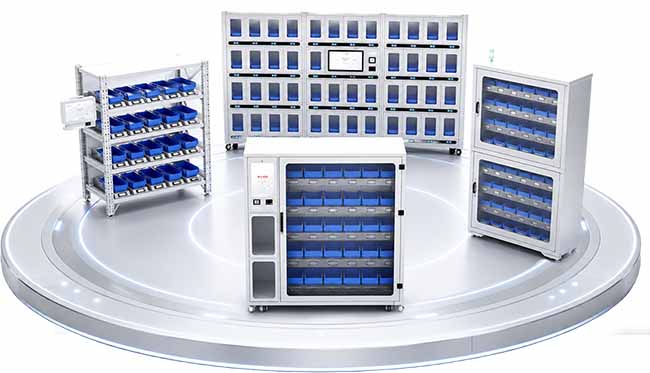
An NVMI-H open smart cabinet supports direct picking from assigned weight-sensing bins. It may suit frequently used tools where fast access and stock visibility matter more than identifying each individual user. Place it where machinists can obtain replacement tools without creating an unnecessary detour, while leaving enough room for safe picking and replenishment.
An NVMI-D enclosed smart cabinet combines enclosed storage with configured identity verification and permissions. It may suit a shared tool point where the site wants to manage who opens the cabinet and review related material movements. Confirm the proposed authentication method, user groups and exception process before specifying it.
Where separate compartments are useful for selected materials, the NVMI-G compartment smart cabinet offers another layout to evaluate. Match any controlled-access approach to the actual tool issue policy. Cabinet-level access, compartment access and a detailed record of a particular tool are different requirements; write down which one the site needs.
Separate Cabinet Inventory from CNC Tool-Life Tracking
A cabinet stock record describes material entering or leaving a storage location. It does not measure how long a cutter spent in the spindle, how many holes a drill made or whether an insert edge has worn. Some CNC controls provide their own tool usage and life-management functions using machine data and limits set by the operator. Those functions answer a different question from “How many replacements are in the cabinet?”
For useful cutting tool tracking, decide whether the project needs only cabinet stock visibility or also an association with a machine, job, user or tool assembly. A named cabinet withdrawal does not automatically establish which machine used the item. That association needs a defined entry process or a technically confirmed data exchange. Avoid presenting automatic tool-life calculation, job costing or CNC connectivity as an inherent smart cabinet function.
The distinction matters when reviewing consumption. An increase in issued inserts could reflect more production, a process change, damaged stock, a different workpiece material or shorter tool life. The cabinet identifies an inventory pattern for investigation; machining data and operator input help explain it.
Design a Clear Return and Reconditioning Process
Cutting tools do not all follow a simple “issued and consumed” path. An unused drill may be returned. A worn tool may be awaiting inspection. A regrindable tool may leave the site and later return in a different usable condition. If all of these are added back to the same available bin, the stock figure can become misleading.
Define statuses and physical locations before launch: available new stock, issued stock, unused returns pending check, items awaiting reconditioning and scrap. Decide who may change each status and what information must accompany a return. When a reconditioned tool differs in dimensions or approved application from a new one, determine whether it needs a separate SKU or another explicit identifier.
The cabinet can monitor suitable stored stock. Inspection, reconditioning decisions and tool-condition approval remain operational steps performed by qualified personnel. A short, consistently followed return rule is more valuable than a complex status list that no one maintains.
Set Replenishment Around the Machining Schedule
A low-stock alert is useful when it reaches someone who can refill the location before the tool is needed. Assign an owner for each cabinet and identify the reserve-stock location, purchasing contact and supplier route. Set thresholds by SKU and work area using observed demand, refill frequency and the time required to obtain more stock.
Consider upcoming jobs as well as average usage. A tool that moves slowly most weeks may become critical for a scheduled production run. The planner or tool crib may need a separate check for that job rather than relying solely on a historical consumption threshold. Keep approved alternatives visible to the people responsible for tooling decisions; do not substitute tools solely because a cabinet reports a shortage.
If a supplier is expected to refill the cabinet, define the service boundary in the vendor-managed inventory workflow. Agree on approved SKUs, stock ownership, refill responsibility, data access and escalation for unavailable items. Any connection to ERP, MES, WMS, supplier or CNC systems should be scoped and technically confirmed for the project.
Pilot with Real Tools and Real Shift Conditions
Select a manageable group of high-frequency tools and a few items for which managed issue may be useful. Record the current tool-crib process, typical shortage points and how staff resolve them. Include machinists, tool-crib personnel, supervisors and purchasing in the pilot review.
- Confirm the catalog: Check tool designations, variants, approved substitutes and issue units against physical labels.
- Test storage: Verify bin fit, protective packaging and separation of similar-looking items.
- Validate sensing: Remove and return actual quantities, including a full pack and any permitted partial-pack scenario.
- Walk through access: Check that each shift can obtain tools under the proposed permission rules.
- Run exceptions: Test incorrect picks, unused returns, restocking and an item awaiting inspection.
- Review replenishment: Confirm alert ownership and the route from reserve stock or supplier to the cabinet.
Evaluate whether the correct tools were available, how accurately the cabinet records reflected physical stock, how quickly shortages reached an owner and how much work the catalog required to maintain. Review these observations before expanding to more SKUs or additional locations. Do not assume that an illustrative savings figure from another facility will apply to this one.
Frequently Asked Questions
Is a smart cabinet the same as a tool vending cabinet?
They can serve similar inventory goals, but their physical issue methods differ. An NVMI open cabinet allows direct access to assigned bins; enclosed and compartment options provide different access arrangements. Compare equipment using the actual tools, packaging, user permissions and records the site requires.
Can weight sensing count loose cutting inserts?
It may be possible for a suitable, consistently configured SKU, but the result must be tested with the actual insert weight, bin, packaging and issue behavior. Keeping one SKU per assigned location and using a consistent unit of measure are essential planning steps.
Will the cabinet show remaining cutting tool life?
No cabinet stock movement alone can establish remaining tool life. Machine controls or other tooling processes may collect usage information separately. Any proposed connection between those records and cabinet inventory requires a defined workflow and technical confirmation.
How should unused tools be returned?
Set a rule for identifying and checking unused returns before they re-enter available stock. Keep tools awaiting inspection or reconditioning separate so they are not mistaken for ready-to-use replacements.
Should every high-value tool require authorization?
Choose access rules according to the site’s issue process and the need to keep production supplied. Confirm who needs tools on each shift, how urgent replacements are obtained and what level of record is actually required.
Can cabinet data be linked to a machine or job?
That depends on the data captured during issue and the project’s confirmed system interfaces. A stock-change event alone does not identify a machine or job. Specify the desired association before choosing software fields and integration scope.
References & Sources
NVMI-H, NVMI-D and NVMI-G product information informs the cabinet descriptions above. Haas CNC operator documentation distinguishes machine tool usage and tool-life management from physical replacement stock. Product configuration and any system interfaces should be confirmed for the proposed deployment.
Plan a Cutting Tool Inventory Pilot
To review a suitable configuration with NVMI, share your highest-frequency cutting tool SKUs, dimensions, packaging and current storage method. Describe how tools are issued and returned, where stockouts or mixed items occur, and how line-side replenishment works. Include the number of users, access-control needs, proposed cabinet locations, integration scope and the measures you want the pilot to improve. Those details provide a practical starting point for cabinet layout, sensing tests and a reliable tool-issue workflow.