MRO Consumables Inventory: From Manual Issue Records to Digital Dispensing
MRO consumables inventory is difficult to manage when maintenance staff need immediate access to materials but issue records are completed later. A technician may collect gloves, abrasive products, cleaning supplies or small replacement parts during an urgent job, then return to a paper form after the equipment is running. If the entry is missed or lacks a clear item and quantity, the storeroom balance no longer reflects what is available.
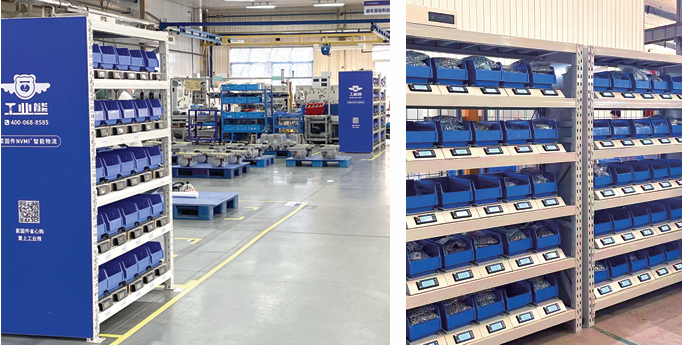
Moving to digital dispensing starts by defining the issue process, not by choosing a cabinet screen. The team must know which materials are available for direct collection, which require authorization, what information an issue record must contain and who acts when stock runs low. Connected storage can support those steps by linking suitable material movements with inventory data. It still requires correct item setup, verified refilling and a practical exception process.
Quick Answer
Group MRO consumables by frequency of use, consequence of a shortage and access requirements. Give each item an approved identity and location. Define the normal sequence from request and collection to issue record, return and replenishment. Use open connected bins for suitable frequently used materials, and evaluate enclosed, permission-based storage for selected controlled items. Test what the proposed system actually records: a stock change, a named-user withdrawal or a job-linked issue are different levels of information.
Key Takeaways
- Digitizing an unclear paper process can preserve its errors in a new format.
- Routine low-value consumables and selected controlled items need different collection rules.
- A detected inventory change does not automatically establish who used a material or on which job.
- Low-stock alerts need an owner, a response path and confirmation of the physical refill.
- Start with a manageable material group and test normal and exceptional transactions before expanding.
Contents
- Where manual issue records break down
- Classify MRO consumables by workflow
- Define the digital issue process
- Decide what each record must show
- Select a suitable storage point
- Connect issues to replenishment
- Handle returns and exceptions
- Plan system data exchange
- Pilot checklist and measures
- Frequently asked questions
Where Do Manual Issue Records Break Down?
A paper log usually records an issue only if the person collecting material has time to complete it and knows which fields to fill in. During planned maintenance, that may be manageable. During an urgent repair, the technician’s first concern is restoring the equipment. The log can become a reconstruction of what happened rather than a record made at the point of collection.
Descriptions create a second gap. “Grinding disc” or “cleaner” may refer to several approved SKUs. An entry that does not identify the exact item, unit and quantity cannot reliably update inventory. If the storekeeper later interprets the handwriting, the resulting system balance may be precise but wrong.
Manual handovers also obscure location. Material may move from a central tool crib to a maintenance cabinet, then into a technician’s kit. A paper record of the first transfer does not necessarily show that the item was used. Likewise, an issued item can be returned unopened, partly used or mixed with unidentified stock. Those events need different treatment.
Before replacing forms, map the current route: who requests material, who authorizes it, who opens the store, who picks it, when the stock balance changes and who refills the location. Identify the steps where information is missing or entered twice. The redesigned process should solve those handoffs.
Classify MRO Consumables by the Way They Are Used
MRO inventory management should not apply one issue rule to every material. Frequently used, low-value C-parts and consumables often need convenient access and dependable replenishment. Selected higher-value, restricted or quality-sensitive items may justify named-user permissions and a more detailed record. Some materials have storage or handling requirements that must be evaluated separately before they are considered for any cabinet.
Use a simple classification discussion with maintenance, warehouse, purchasing and the relevant site teams. Ask how often the item is collected, whether its specifications are easy to confuse, what happens if it is unavailable and whether the organization needs to know who collected it. Include physical size, packaging, unit weight and the condition in which it may be returned.
| Material group | Primary operating need | Issue approach to evaluate |
|---|---|---|
| Frequently used suitable consumables | Quick collection and timely refilling. | Clearly identified open bins with connected stock monitoring where useful. |
| Similar-looking replacement items | Correct identification at the point of collection. | Separate locations, complete labels and a picking check. |
| Selected controlled materials | Defined users and clearer withdrawal records. | Enclosed or compartment-based access, subject to configuration. |
| Slow-moving maintenance spares | Findability and condition control. | Identified central storage with an appropriate issue record. |
Classification is not a permanent label. An item used occasionally today may become a high-frequency consumable after a process change. Review the groups as equipment, maintenance plans and supplier arrangements change.
Define the Digital Material Issue Process
In this guide, “digital dispensing” means that a material collection is supported by a defined digital inventory workflow. It does not imply that every cabinet mechanically releases one item at a time. An operator may still pick directly from an assigned bin. The important questions are what the system detects, what the user must enter and how the resulting record is interpreted.
Write the normal sequence for each material group. A technician identifies the required SKU, reaches the assigned storage point and collects the needed quantity. The system or user captures the agreed movement. A supervisor or storekeeper reviews exceptions, and the refill owner restores stock when the defined trigger is reached. Each step should have one clear responsibility.
Keep the routine proportionate. Requiring a detailed work-order entry for every inexpensive washer may discourage consistent use. Conversely, an unrestricted shared bin may not meet the site’s needs for a selected maintenance component. Decide where identity verification or job attribution is necessary, then test the collection time and record quality with actual users.
Define when stock is considered issued. Is it when the technician takes material from a cabinet, when a central store transfers it into that cabinet or when the material is charged to a maintenance job? These events may occur at different times. If they are treated as the same transaction, inventory and consumption reports can be misleading.
What Should a Digital Issue Record Show?
Start with a small set of fields that support a real decision. The record should identify the approved item, the storage location, the quantity or detected stock change and the time of the event. Add the user, job, equipment or cost center only where the workflow captures that information and the organization needs it.
A stock-change record and a named-user issue record are not interchangeable. A connected weight-sensing bin can detect material being added or removed. Attributing a particular change to a person depends on configured identification and transaction rules. Linking it to a repair task requires a reliable job reference and an agreed point at which that reference is entered.
Units of measure matter as much as field names. A box received from a supplier may contain multiple pieces, while a technician takes a few individual items. Record the pack conversion and decide whether partial packs can be returned. For suitable materials measured through weight changes, validate unit weight, packaging and normal pick size with the actual item. Weight alone does not verify that the right SKU was loaded into a bin.
Make corrections visible to the people responsible for inventory. If a physical count disagrees with the digital balance, investigate the reason and record an authorized adjustment. Silent changes hide whether the cause was a missed receipt, an unrecorded transfer, a return or a bin setup problem.
Choose the Storage Point Around Access and Material Flow
The NVMI-H open smart cabinet is designed for direct access to suitable materials in assigned weight-sensing bins. Connected inventory information supports review of stock changes, usage and low-stock alerts. It can be considered where frequently used fasteners and industrial consumables need to remain within reach of production or maintenance staff.
When a selected item requires permission-based collection, the NVMI-D enclosed smart cabinet offers a different workflow with configured identity verification and material-use records. The access method and permission groups should be agreed for the site. An enclosed door controls entry to the cabinet; the team must still verify item identity during receiving and refilling.
Changing work areas may call for a movable supply point. NVMI-X offers mobile open storage, but movement routes, floor conditions, power and connectivity need review. Slow-moving spares may remain in a central store rather than occupying point-of-use space. A digital tool crib can therefore be a network of appropriately managed locations, not a requirement to put every MRO item into one device.
Place each location where collection and replenishment can both happen reliably. A cabinet close to technicians may improve access while creating a refill problem if the storekeeper cannot reach it during normal rounds. Review the path from central reserve stock to each working location as part of wider material-flow planning.
Connect Material Use to a Refill Response
Set a minimum level around the time needed to restore stock, expected use during that period and appropriate allowance for variation. An alert should prompt a specific response: a transfer from the central store, a purchasing review or a supplier refill. State who receives it, who checks reserve stock and who confirms the physical addition to the bin.
A low-stock alert is a signal, not a guarantee of automatic purchasing or delivery. If several locations use the same item, the team needs to know whether stock can be transferred internally or must be reordered. Record what happens when a supplier is late, a pack is incomplete or demand rises during an equipment shutdown.
Where suppliers manage selected industrial consumables, agree on stock ownership, authorized access, data visibility, refill frequency and receipt confirmation. Any consignment or vendor-managed inventory arrangement needs defined commercial and operating terms. The NVMI inventory overview provides a starting point for that discussion.
Plan for Returns, Discrepancies and Outages
Normal issues are only part of a maintenance workflow. A technician may collect an item and discover that the fault lies elsewhere. Define whether an unopened, identified item can be returned directly, who checks its condition and how the return is recorded. Loose or unidentified items should not be placed into an approved live bin without an authorized check.
Decide how staff work if power or connectivity is unavailable. Which materials remain accessible? Is a temporary issue record required? Who enters or reconciles the movements when service is restored? The answer may differ between an open cabinet and an enclosed, permission-based point. Test the site’s actual fallback procedure before deployment.
Set an escalation route for an empty bin, incorrect label, suspected mixed contents or unresolved alert. Make it easy for users to report a problem without guessing a quantity to make the screen look correct. A trusted inventory record depends on visible exceptions and timely reconciliation.
Decide How Cabinet Data Fits Existing Systems
Before specifying an ERP, MES, WMS or supplier interface, identify the system that owns the approved SKU master and the stock balance for each location. Map how a receipt, transfer, withdrawal, return and adjustment should appear in both systems. If the cabinet and warehouse platform each post the same movement as consumption, reports can double-count usage.
Specify the fields and timing required by the operation. Some teams need a local stock alert and refill confirmation first. Others need a job or equipment reference for selected items. Confirm interface availability, event mapping, user permissions and exception handling for the actual project. A claim that systems can exchange data does not define what will be connected at a particular site.
Pilot the Process Before Expanding
Select a manageable group of MRO consumables with different collection needs: frequently used open-access items, one or more materials that require controlled access and items associated with recent stock discrepancies. Record the baseline process, including issue-log completion, emergency requests, empty-bin events and adjustments. Then test the proposed digital workflow through a complete refill cycle.
- Confirm the approved SKU, unit, packaging, physical suitability and assigned bin.
- Define who may collect, refill, return and correct each material group.
- Walk through normal issue, partial issue, return and stock adjustment scenarios.
- Check what the system records and whether it answers the intended user or job question.
- Follow a low-stock signal from alert to confirmed physical refill.
- Test an unavailable system and an item with unclear identity.
- Review the observations with technicians, warehouse staff and purchasing.
Use measures that show whether the process is dependable: missing or incomplete issue records, time between an alert and a refill, unresolved discrepancies, emergency collection and stock differences found during checks. Interpret them alongside maintenance workload and supplier changes. Do not assume that equipment alone caused an improvement; the new responsibilities and material data are part of the change.
Frequently Asked Questions
Is digital dispensing the same as a vending machine?
No. It can refer to a connected material-issue workflow in which users collect items from assigned bins and the system supports inventory records. The physical collection method depends on the cabinet model and configuration.
Should every MRO consumable require user login?
Not necessarily. Routine, low-value items may suit direct access, while selected restricted or higher-value materials may justify configured identity verification. Base the rule on the item and the record your operation needs.
Can weight sensing identify which consumable was taken?
It detects a change at an assigned sensing unit. Correct item identification depends on accurate bin setup and verified refilling. The proposed unit should be tested with the actual material and packaging.
Will low-stock alerts automatically prevent shortages?
No. Alerts support earlier attention, but availability depends on thresholds, reserve stock, supplier response and a person responsible for completing the refill.
Can digital issue data be linked to maintenance work orders?
That depends on the configured issue process and confirmed system interface. Define which materials need a work-order reference, where users enter it and how the data is validated.
What information should we prepare for a cabinet review?
Prepare the material list, typical pick quantities, package formats, current storage points, users, access needs, refill process and any data fields required by your existing systems.
References & Sources
- Bear Bit NVMI-H, NVMI-D and NVMI-X product descriptions — current information on open, enclosed and mobile collection workflows.
- Bear Bit NVMI platform overview — current information on connected stock monitoring, material-use records and low-stock alerts.
Review Your MRO Issue Workflow
Share your top high-frequency SKUs, material categories, current storage and manual issue process, number of users and access-control needs. Include stockout frequency, shrinkage or mixing problems, line-side or maintenance-area replenishment workflow, deployment locations, integration scope and target KPIs. The NVMI team can use that information to review a suitable first group of materials, cabinet layout and digital issue process with you.