PPE smart inventory cabinet planning starts with a practical question: can every worker get the right approved protection, in the right size, when the task begins? Gloves, safety glasses, hearing protection and other safety supplies may be inexpensive individually, but an empty bin, an unsuitable substitute or a locked storage room can disrupt work. A cabinet can make stock movements visible and support timely replenishment, provided the site first defines its PPE requirements and keeps access workable across shifts.
PPE Smart Inventory Cabinet: Access Control, Usage Records and Replenishment
Quick Answer
A PPE smart inventory cabinet stores selected safety supplies near the people who use them and records stock changes through its configured identification and sensing methods. Open storage can suit frequently used items that workers must obtain quickly. Enclosed storage can add managed access for selected items. Low-stock alerts and issue data help an assigned team replenish supplies and investigate unusual patterns. The cabinet does not determine which PPE is safe for a task, verify that a worker wore it correctly or replace the employer’s PPE program.
Key Takeaways
- Begin with the site’s approved PPE list, hazard assessment and applicable local requirements. Let the safety team decide specifications and substitutions.
- Separate frequently used, readily accessible supplies from items that need tighter issue control or special storage.
- Track sizes and variants as distinct SKUs; a total glove count does not show whether the required size is available.
- Interpret a stock movement or issue record according to what the installed system actually measures and identifies.
- Give every low-stock alert an owner, a replenishment method and a way to handle exceptions.
Why PPE Inventory Needs Its Own Rules
PPE inventory management has a different starting point from ordinary consumables control. The objective is to maintain access to suitable protection for the work being performed. Purchasing teams may focus on quantities and suppliers, while supervisors see shift demand and safety teams define approved items. A useful inventory process connects those responsibilities without allowing stock policy to override safety decisions.
Demand can change quickly. A new task, temporary crew, cleaning activity or change in production mix may increase use of one glove type or eyewear style. Workers may also need different sizes of the same approved product. A cabinet that reports “gloves available” is of limited value if the required size or material is missing. Plan the catalog at the level needed to make a safe selection: item, specification, size, package unit and any approved alternatives.
Availability also depends on location and time. Supplies held in a central storeroom may be counted accurately but remain inconvenient to obtain on a night shift. Conversely, placing stock at every workstation without a replenishment owner can leave some locations empty while others accumulate excess. The right layout reflects tasks, worker movement, shift coverage and the site’s existing safety procedures.
Define the Approved PPE Catalog Before Choosing Storage
The safety or other qualified site team should decide which PPE is required for each hazard and task, who may select an alternative, and what instructions apply to use and care. The inventory team can then translate that approved catalog into cabinet SKUs and storage locations. A product name alone is insufficient when protection level, size, fit or compatibility matters.
For each candidate SKU, record its approved description, unit of issue, expected users, work areas, storage instructions and replenishment contact. Identify any item that requires inspection, cleaning, controlled conditions or separate handling. Follow the manufacturer’s instructions and the site’s procedures for those items. A smart cabinet should not be assumed suitable for every type of PPE, including specialized respiratory, electrical or potentially contaminated equipment.
Review substitutions explicitly. If an approved size or model is unavailable, workers need a defined route to obtain suitable protection and escalate the shortage. The inventory interface should not suggest that any visually similar product is interchangeable.
Match Each PPE Category to an Issue Method
One storage rule rarely fits every safety supply. A short classification exercise helps determine where open access is appropriate and where a controlled issue process adds value.
| PPE category | Typical inventory question | Planning consideration |
|---|---|---|
| Frequently used disposable items | Will the correct type and size be available at the point of use? | Prioritize clear labels, separate SKUs, easy access and frequent replenishment checks. |
| Safety eyewear and hearing protection | Which approved variants are needed by different tasks or users? | Keep variants identifiable and account for packaging, cleanliness and replacement procedures. |
| Selected reusable or higher-value items | Is a record of who received an item useful for follow-up? | Consider managed access where appropriate, alongside inspection and care rules outside the cabinet system. |
| Specialized PPE | Does the item have specific fitting, handling or storage requirements? | Confirm suitability with the safety team and manufacturer before including it in a cabinet. |
This classification is a planning tool, not a universal assignment of products to compartments. Some high-frequency items still need specific handling; some controlled items must remain immediately available to authorized workers. Test each proposed rule against the actual task and shift conditions.
How a PPE Smart Inventory Cabinet Should Handle Access
Access control should support the PPE program. For routine, approved supplies, workers need a straightforward path to the item they require. For selected products, a site may want to identify users, limit access to designated groups or keep an issue history. These choices should reflect the safety team’s rules rather than a blanket effort to reduce withdrawals.
An open cabinet can put labeled supplies close to production while monitoring stock changes. An enclosed cabinet may be appropriate when the site needs configured identity verification and permissions for certain items. Before deployment, walk through real situations: a worker changing tasks, a contractor arriving after hours, a damaged item needing replacement, a size running out and a network or power interruption. The site should define how required PPE remains obtainable in each case.
A withdrawal limit is particularly sensitive. High usage may indicate waste, but it may also reflect damaged PPE, a task change, additional workers or the need for more frequent replacement. Review the cause before changing access rules. Do not make an arbitrary cabinet quota the deciding factor in whether someone receives required protection.
Understand What an Issue Record Can Prove
A digital record is useful only when its meaning is clear. Weight sensing can detect a change in stock at a configured location. Depending on the cabinet and workflow, an event may be associated with a user, time, cabinet or SKU. The team should verify how its chosen configuration handles multiple items removed together, returns, packaging differences, restocking and corrections.
A stock movement does not by itself establish that a particular worker used the item. Even a named issue event does not prove that the PPE fitted, was inspected, was worn for the task or was used correctly. Training, fit-related procedures, supervision and equipment care remain separate parts of the site’s PPE program.
Set up reports around questions the data can answer: which SKU and size needs replenishment, which location sees recurring shortages, and where should the team review an unusual stock change? If user-level records are needed, specify that requirement before choosing the cabinet and confirm it in the proposed workflow. Explain to workers what is recorded and why, following the site’s applicable privacy and employment rules.
Replenish by SKU, Size and Location
A low-stock alert is the start of a response, not the replenishment process itself. Assign an owner for each cabinet or group of locations. Define who reviews alerts, where reserve stock is held, how a refill is recorded and who resolves a supplier shortage. Establish a practical route for workers to report an empty bin even if the system has not raised an alert.
Set thresholds using observed use, refill frequency and the time needed to obtain stock. A single threshold for every glove size may hide a fast-moving size or cause unnecessary refills of a slow-moving one. Review consumption at the SKU and location level, then adjust thresholds after the pilot. Where seasonal work, shutdowns or temporary crews change demand, review the settings again.
Keep the physical process consistent with the data. Separate sizes and approved variants, label bins clearly, and record replenishment against the correct SKU. Investigate discrepancies rather than quietly changing a count. If supplier-managed stock or consignment is being considered, define ownership, refill responsibility and the data each party needs before agreeing on the operating model.
Choose a Cabinet Format for the Work Area
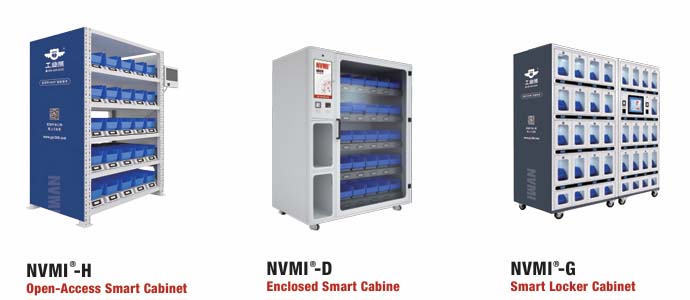
The NVMI-H open smart cabinet provides open bin access with weight-sensing stock monitoring. It may suit frequently used, packaged safety supplies where workers need quick access and the site can maintain clear SKU separation. Assess whether the available bin layout fits the product dimensions and issue units.
The NVMI-D enclosed smart cabinet supports an enclosed, permission-based workflow with weight-sensing stock changes. It may suit selected items for which the site wants a managed issue process. Confirm the identification method, permission rules and exception process for the intended deployment.
A mobile open cabinet, such as NVMI-X, can be considered when the point of use moves with a production area or project. Check placement, safe movement, power, connectivity and the replenishment route at each location. Cabinet selection should follow the approved item list and site workflow, not the other way around.
Connect PPE Data to the People Who Act on It
Inventory data can support a wider smart warehouse workflow when the same SKU definitions and location rules are used across receiving, storage and issue. The immediate goal is modest and concrete: make the person responsible for replenishment aware of what is low and make the next action clear.
For organizations considering vendor-managed inventory, agree on which PPE SKUs the supplier may replenish, how approved substitutions are handled and who resolves discrepancies. Any exchange with ERP, MES, WMS or supplier systems should be scoped and technically confirmed for the project. Do not assume that a dashboard automatically creates purchase orders or transfers responsibility for PPE selection.
Pilot the Full Shift, Including Exceptions
A useful pilot covers a small group of approved SKUs, several sizes and a work area with a clear replenishment owner. Record the starting stock and the manual process before installation. Include workers, supervisors, safety staff and the people who refill the cabinet in the review.
- Map the task: Confirm which approved PPE is needed, where workers obtain it and what happens when a size is unavailable.
- Set up the catalog: Give each distinct type and size its own SKU and check labels against the physical stock.
- Test normal issues: Verify that workers can obtain items at the times and locations they need them.
- Test exceptions: Simulate a damaged item, incorrect withdrawal, empty bin, refill, shift change and loss of connectivity.
- Review the records: Compare cabinet events with observed stock and clarify any difference in units or interpretation.
- Adjust replenishment: Assign alert owners and refine thresholds using observed demand and refill timing.
Evaluate whether approved PPE stayed accessible, whether the right sizes were present and whether shortages reached someone able to act. Also review worker feedback and the effort needed to maintain the catalog. These observations provide a sounder basis for expansion than a promised savings percentage.
Frequently Asked Questions
Is a PPE smart inventory cabinet the same as PPE vending?
Both can support point-of-use supply and issue records, but the physical issue method differs by equipment and configuration. A smart cabinet may use open bins or enclosed access rather than dispensing one unit from a vending mechanism. Compare products against your PPE packaging, sizes, access needs and replenishment workflow.
Can a cabinet record which employee used PPE?
A configured issue process may associate a withdrawal with an identified user. Confirm precisely what the proposed system records. An issue record shows an inventory event; it does not establish that the item was worn, fitted or used correctly.
Should every PPE item require authorization?
No single access rule fits every item. Keep required protection obtainable for the people and tasks that need it. The safety team should approve any restrictions and the process for exceptions, including night shifts and temporary workers.
Can weight sensing distinguish glove sizes in one bin?
Do not rely on it to identify visually or physically similar variants mixed in a shared location. Assign separate, clearly labeled SKU locations and test the sensing configuration with the actual product and packaging.
Can a supplier replenish the cabinet?
That can be part of a project-specific VMI or consignment arrangement. Define approved SKUs, refill responsibility, stock ownership, reporting and shortage escalation with the supplier. Confirm any system data exchange during project planning.
Can specialized PPE be stored in a smart cabinet?
Only after the safety team verifies that the proposed storage conditions and issue process meet the item’s instructions and site requirements. Some equipment needs inspection, cleaning, fitting or handling steps that a cabinet cannot perform.
References & Sources
OSHA, 29 CFR 1910.132, General Requirements, provides U.S. general industry context for hazard assessment, PPE selection and training. Site-specific legal requirements may differ. NVMI-H and NVMI-D product information informs the cabinet descriptions above; available functions and configuration should be confirmed for each project.
Plan a PPE Inventory Workflow
To discuss a pilot with NVMI, share your highest-frequency PPE SKUs and sizes, current storage and issue method, stockout frequency, and any mixing or unexplained stock changes. Include the users who need access, shift patterns, deployment locations, line-side replenishment route, desired system data exchange and the measures you will use to judge the pilot. That information helps define a cabinet layout and workflow that supports reliable access to approved PPE.