Shared tool tracking system design starts with a practical problem: a worker needs a tool, its assigned storage location is empty, and nobody knows whether it is still in use, awaiting inspection or sitting at another workstation. Buying another tool may address the immediate shortage, but it leaves the underlying issue unresolved. A smart cabinet can support organized storage, managed access and stock-movement records. A reliable checkout process also needs clear identification, custody and return rules.
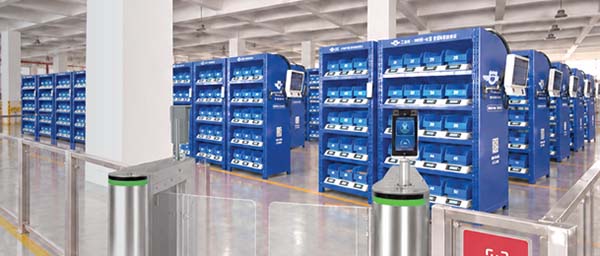
Shared Tool Tracking System: From Cabinet Access to Confirmed Return
Quick Answer
A shared tool tracking system should establish which tool was issued, who accepted responsibility, when it should return and whether it is ready for the next user. Smart cabinets can provide controlled storage and inventory-movement information. Individual asset identification, borrowing records, return inspections and exception handling complete the operating process. Confirm which steps the proposed cabinet and software support, and which require an asset register, another system or a documented manual action.
Key Takeaways
- Decide whether you need the quantity of a tool type or the history of each individual tool.
- Keep user authentication, tool identification and return approval as distinct requirements.
- Use a documented handover when a tool passes between workers or shifts.
- Separate returned items awaiting checks from tools approved for immediate use.
- Investigate missing tools through the borrowing process before treating every empty location as a purchasing requirement.
Contents
- Choose the right tracking level
- Build the tool and borrowing records
- Define checkout, handover and return
- Select a cabinet arrangement
- Manage overdue tools and exceptions
- Pilot and evaluate the workflow
- Frequently asked questions
Choose the Right Level of Tool Tracking
Industrial tool management covers several different questions. A maintenance team may only need to know how many interchangeable hand tools remain in a shared store. For a measuring instrument, the team may need to distinguish one physical unit from another because each has its own service history. A kit creates another requirement: knowing whether all expected components came back.
Start by classifying the items and deciding what information is necessary for each group. Applying an individual borrowing process to every low-value item can create unnecessary work. Recording only a quantity for a tool with an individual inspection or calibration history can leave important gaps.
| Tracking level | Question it answers | Information to establish |
|---|---|---|
| Tool type or SKU | How many suitable units are available? | Tool description, assigned location, quantity and stock movements. |
| Individual asset | Which physical tool was issued and returned? | Unique asset ID, borrower, issue event and return record. |
| Tool kit | Was the complete kit returned? | Kit identifier, contents list and a defined completeness check. |
| Service-controlled item | Is this particular tool approved for use? | Individual identification, service status and release authority. |
A weight change can support a quantity or movement record. Establishing the identity and condition of a particular returned item requires an appropriate additional process.
Build a Useful Tool Record and Borrowing Record
The tool record describes the item itself. Include its name, model or specification, asset identifier where needed, normal storage location, responsible department and handling instructions. Record whether the item is interchangeable with others, belongs to a kit or requires inspection before release. Keep the description consistent with the physical label.
For individually tracked returnable tools, choose an identifier that stays with the physical item throughout its working life. An internal asset number may be sufficient for a site-level program. Where a standardized identification scheme is useful, the GS1 Global Individual Asset Identifier provides a framework for identifying an individual asset. The identifier and its capture method must be selected for the project; adopting an identifier does not establish cabinet compatibility.
The borrowing record describes a transaction. Define the borrower, item or asset, issue time, expected return point and any agreed return time. Add a job, work order or destination only when someone will use that information. Specify where these records are maintained and how they are linked to cabinet events. Due dates, reservations and overdue notifications should be explicit software requirements rather than assumed features.
Design Checkout, Handover and Return as One Workflow
A tool checkout cabinet works best when workers can follow the same short process on every shift. Design the workflow around how the tools are actually used, including emergency maintenance, extended jobs and transfers between technicians.
- Identify the user: Establish who is collecting the tool through the configured access method or issue procedure. Shared credentials weaken individual responsibility.
- Identify the item: Confirm the tool type and, where required, the individual asset. A user login alone does not identify the physical tool taken.
- Record the issue: Capture the movement and create or update the borrowing record through the agreed process.
- Confirm the return expectation: Make the return location and any agreed timing clear to the borrower.
- Record a handover: If another worker takes custody, update responsibility through a documented transfer.
- Check the return: Confirm identity, completeness and the checks required for that item before making it available again.
Consider a shared torque wrench used during maintenance and then passed to the next shift. If the handover is informal, the borrowing record continues to point to the first technician. A documented transfer keeps the last known custodian useful. This remains a custody record; it does not provide continuous location tracking around the factory.
Define an exception route for urgent work. Workers need to know who can authorize access, correct an incomplete transaction or resolve a tool that cannot be returned on time. Assign responsibility for reconciling those exceptions so they do not accumulate as unexplained inventory differences.
Use Weight Sensing with Clear Identification Rules
Weight sensing can detect that an item was removed from or added to an assigned location. Test the proposed configuration with the actual tool, protective case and accessories. Decide whether a tool is stored alone, alongside identical units or as part of a kit. Packaging changes and objects placed in the wrong location can affect the meaning of the measurement.
For an individually tracked tool, the process must confirm that the expected asset returned. A similarly weighted tool can create a plausible weight change while belonging to a different record. A kit may also return with missing components. Use the agreed identity and completeness checks to resolve these cases.
Keep the acceptance criteria practical: remove the correct item, return it, return a different item, omit an accessory and place an unrelated object in the location. Observe what the system detects and what action the operator must take. This establishes the actual capability before the workflow is extended to more tools.
Separate Physical Return from Release for Use
A returned tool may still need cleaning, inspection, repair or a service-status check. Establish a return location for items awaiting those actions. Workers should be able to distinguish available tools from items that are physically present but temporarily unavailable.
For a kit, maintain a contents list and define who checks it. For a damaged tool, record the problem and route it to the responsible person. Where calibration or another service requirement applies, follow the site’s established equipment-control procedure and manufacturer instructions. The cabinet movement record does not assess the tool’s condition or verify calibration status.
Choose a small set of useful states, such as available, issued, awaiting inspection and under repair. Define who may change each state. If the site wants permissions to depend on equipment status, specify that requirement and confirm the software and integration scope before purchase.
Match the Cabinet Arrangement to the Access Requirement
The NVMI-D enclosed smart cabinet combines configured user verification, permission-based access and weight-sensing inventory changes. It can be evaluated for shared stores where the team needs managed collection and material-use records. Confirm how the proposed workflow associates access sessions with individual movements.
The NVMI-G compartment smart cabinet provides individually controlled compartments with weight-sensing modules. Its separate storage can support an arrangement built around selected tools or suitable returnable items. Review compartment dimensions, item weights and handling requirements, along with the proposed identification and return process.
NVMI-H offers open access with connected stock monitoring. It may suit suitable items where quantity visibility is the priority. For any model, document whether the requirement concerns access to the cabinet, access to an assigned compartment or confirmation of a specific asset. Select and validate the complete process against that requirement.
Handle Overdue Tools, Missing Items and Availability
Returnable items require a different response from consumables. An empty location may mean that a tool is working on an approved job. Buying a replacement immediately can create unnecessary duplication. First review the borrowing record, expected return and any recorded handover.
Assign a person to follow up overdue loans, whether the review is manual or supported by confirmed software functions. Ask whether the tool is still needed, has moved to another worker or has been placed in a repair area. Update the record after resolving the issue. The same process should handle a tool returned to a different cabinet or brought back without a completed transaction.
Track available capacity as well as ownership. A site may own enough tools overall while having too few ready for use because others are under repair. When suppliers replenish consumables alongside the tool program, keep the vendor-managed inventory arrangement clear about purchasing and refill responsibilities. Borrowed assets and consumed supplies should follow their respective operating rules.
Connect Cabinet Events to the Existing Asset Register
Before connecting systems, decide which record is authoritative for asset identity, user permissions, borrowing history and service status. The cabinet platform may provide inventory movements while another register maintains individual equipment records. Define how each event reaches the record that needs it.
List the required information exchange, responsible team and reconciliation process. Include what happens when connectivity is interrupted or a transaction needs correction. Interfaces with ERP, MES, WMS or maintenance and asset systems require project-specific technical confirmation. A successful login or stock update alone does not establish that all borrowing fields have synchronized.
For a wider deployment, the same ownership and location definitions should carry across departments. Related inventory and material-flow guides can help frame the surrounding storage and replenishment processes.
Pilot the Workflow Before Expanding
Choose a manageable group of frequently borrowed tools, some individually identified assets and a kit if kits are part of the intended scope. Include the people who issue tools, borrow them, inspect returns and investigate shortages.
- Check identification: Confirm that labels and records distinguish the items that require individual histories.
- Test normal use: Complete checkout and return on each relevant shift.
- Test handovers: Transfer custody between workers and verify that the responsible person can be found.
- Test returns: Include a wrong item, an incomplete kit and an item awaiting inspection.
- Test exceptions: Review overdue loans, urgent access and interrupted transactions.
- Reconcile records: Compare physical contents, cabinet movements and the borrowing register.
Evaluate tool-search time, unresolved loans, record completeness and the availability of tools approved for use. Define each measure before comparing results. Review the effort required from workers as well as administrators. Expand when the process is dependable and the remaining exceptions have clear owners; avoid assuming a universal savings percentage.
Frequently Asked Questions
Does every shared tool need an individual asset number?
No. Quantity tracking may be sufficient for interchangeable items. Individual identification becomes useful when the site needs a specific tool’s borrowing, service or inspection history.
Can weight sensing confirm that the correct tool returned?
Weight sensing detects a change at the storage location. Confirming a particular asset requires the agreed identification process. Test wrong-item returns during the pilot.
Can the system send overdue reminders?
List due dates, reminder recipients and escalation rules as software requirements. Confirm their availability in the proposed solution or maintain the process in an existing borrowing register.
Can workers return tools to a different cabinet?
That requires a defined process for recognizing the asset, updating its location and closing the loan. Confirm the workflow across the intended cabinets before allowing unrestricted cross-location returns.
Can a cabinet check a tool kit automatically?
Do not assume that a weight reading establishes kit completeness. Define the contents and the required inspection or identification method, then validate how missing components are handled.
Will checkout records show a tool’s current location?
They can show the recorded borrower or destination when that information is captured. Continuous location tracking requires a separate, explicitly specified capability.
References & Sources
NVMI-D, NVMI-G and NVMI-H product information informs the cabinet descriptions. The GS1 Global Individual Asset Identifier glossary entry explains individual asset identification. Borrowing, inspection and escalation procedures above are implementation recommendations; their software support must be confirmed for the project.
Plan a Shared Tool Tracking System Around Your Workflow
To discuss a shared tool tracking system with NVMI, share your tool list, item dimensions, weights, existing asset labels and highest-frequency borrowing needs. Describe current storage, checkout, handover and return methods, including missing items, mixed tools and line-side availability problems. Include user count, access-control needs, deployment locations, integration scope and target measures. These details help define a suitable cabinet arrangement and a checkout process that can be tested against actual daily work.