Multi site smart cabinet deployment involves more than installing the same cabinet at several plants. A single-site project can be managed by one local team with familiar materials, users and replenishment routines. Across multiple sites, the company must decide which rules remain common, which settings belong to each plant and how inventory data should be compared. Those decisions affect the usefulness of the entire rollout.
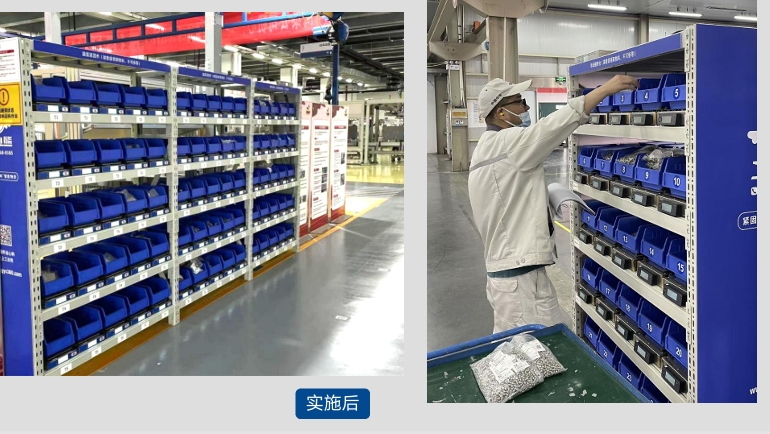
A manufacturer might begin with fasteners beside one assembly line, then consider maintenance stores, warehouses and other factories. The first cabinet can demonstrate how connected bins record stock changes and support replenishment decisions. It cannot, by itself, prove that another plant uses the same item codes, issues materials in the same way or has the same network and access requirements. Scaling works best when the pilot establishes a repeatable method while leaving room for documented local differences.
Multi Site Smart Cabinet Deployment: From One Plant to a Repeatable Program
Quick Answer
For one site, define the materials, cabinet location, users, stock rules and person responsible for replenishment. For multiple sites, add a shared approach to item data, site identification, user permissions, reporting definitions, integration and support. Test these rules in one plant, document the exceptions and then introduce the next site in a controlled wave. Standardize the data and decisions that must be comparable; configure cabinet layouts and operating routines around each location's actual materials and work.
Key Takeaways
- A successful single-site pilot is the starting evidence for a rollout, not a universal cabinet specification.
- Use a consistent material identity and unit-of-measure policy before combining inventory reports from different plants.
- Keep stock balances, user permissions and replenishment responsibilities attributable to the correct site and cabinet.
- Decide whether a material movement is a transfer, an issue to a user or a supplier refill; these are different transactions.
- Review connectivity, floor space and support arrangements separately at every deployment location.
- Compare sites with clearly defined KPIs while allowing for differences in material mix and production activity.
Table of Contents
- What does a single-site pilot need to prove?
- What changes across multiple sites?
- How should item and location data be managed?
- Should every plant use the same cabinet?
- Who owns replenishment at each site?
- What is a practical rollout sequence?
- How should results be compared?
- Frequently asked questions
What a Single-Site Pilot Needs to Prove
A focused pilot should answer operational questions before a company commits to additional plants. Are the selected items suitable for the assigned bins? Do employees collect materials through the intended workflow? Are additions and removals reflected in records that the inventory team can review? Does a low-stock alert reach someone who can act on it? Can staff investigate an unexpected balance without losing the history of what happened?
Select one area with a known group of users and materials. Record the existing storage points, item descriptions, packaging units, pick frequency and replenishment steps. Assign an owner for material setup, daily use, refilling, stock corrections and technical issues. Without these responsibilities, an installed cabinet may collect data while the organization continues to rely on informal messages to resolve shortages.
The pilot should also expose exceptions. A material may be returned to a bin, placed in the wrong location or received in a different unit from the one used during picking. A user may collect several items during one visit. A supplier delivery may arrive while the responsible warehouse employee is unavailable. Document how each event is handled, because the same questions will appear at later sites.
At the end of the pilot, produce more than a statement that the cabinet works. Keep an approved item list, a configuration record, user-role definitions, a replenishment procedure, an exception log and agreed reporting definitions. These documents form the starting point for a smart cabinet rollout.
What Changes in a Multi-Plant Inventory System?
At one location, staff may recognize a part even if its description is inconsistent. Across plants, inconsistent codes become a reporting problem. One factory may record a screw by piece while another receives it by box. Two materials may share a similar name but differ in grade or finish. If those records are combined without review, a central dashboard can appear complete while comparing unlike items.
Multiple sites also introduce different operating conditions. One plant may need open line-side access for high-use consumables. Another may use an enclosed store with user authorization. Available floor area, electrical connections, connectivity, shift patterns and local replenishment teams can differ. A deployment standard should therefore define how a site makes and records its choices rather than demand identical hardware everywhere.
Finally, multi-site reporting needs a clear boundary. A central team may want to view stock and consumption across plants, while local teams need to act on specific bins and shortages. Centralized inventory data is useful when each record retains the site, cabinet, material, unit of measure and event type that give it meaning. It should not erase local ownership of an alert or a stock correction.
Build Shared Item Data Without Hiding Local Differences
Before the second site joins, define the minimum material fields used across the program. These commonly include a controlled item identifier, description, material category, unit of measure and relevant specifications. For fasteners, the description may need size, standard, material or property class, finish and packaging unit to distinguish parts that look similar. Decide who approves a new item and how changes are communicated to participating sites.
Separate the shared item identity from local stock settings. The same bolt may have one approved corporate item code but different assigned bins, minimum levels and replenishment routes at two factories. That is a legitimate local difference. Giving it two unrelated item identities solely because the sites operate independently makes consolidated reporting harder.
Location records also need a consistent structure. Define a site, building or production area, cabinet and sensing unit so staff can identify where stock is held. A cabinet moved within a plant should have a documented relocation process. A transfer from a warehouse cabinet to a line-side cabinet should change the two location balances without being mistaken for final consumption.
Data ownership belongs in the rollout plan. Name the team that maintains the item master, the person who verifies each site's starting balances and the role allowed to approve corrections. If the company uses ERP, WMS, MES or a supplier system, specify which application owns each field and how the proposed exchange will be tested. Integration capability and the actual implemented interface are not the same thing.
Set Permissions by Role and Location
A multi-site access policy should answer two questions: who can perform an action, and where can they perform it? A warehouse replenisher at Plant A may not need the same rights at Plant B. A regional manager may need reporting access without permission to edit local stock. A contractor may require access to a defined material point for a limited assignment.
Create a role matrix for picking, refilling, checking stock, correcting records and administering users. Then decide which roles are centrally governed and which are assigned by local managers. Review how an employee transfer, role change or departure affects access at all sites. Shared accounts should be avoided where individual material-issue records are required.
Access requirements can also affect cabinet selection. An open cabinet supports direct collection when that fits the material policy. An enclosed cabinet supports a configured identity and permission workflow. The selected authentication method and any connection to existing credentials should be confirmed for each project rather than assumed to be identical across plants.
Should Every Site Use the Same Cabinet Model?
Using the same model everywhere may simplify some purchasing and training tasks, but cabinet choice should follow the material and access workflow. The NVMI-H open smart cabinet is intended for direct picking with connected weight-sensing units. Its current product page describes single-sided and double-sided configurations with 25 and 50 sensing modules respectively. It can be evaluated for suitable fasteners and consumables in line-side, warehouse or transfer-point settings.
The NVMI-D enclosed smart cabinet is a different choice when identity verification and permission-based material collection are needed. Its published standard configuration has 30 sensing modules. The method of access and the user permissions should be specified for the installation. An enclosed cabinet can belong at a production area as well as a shared material store; physical location does not determine access policy by itself.
The NVMI-X mobile open smart cabinet is designed for changing work areas where material storage needs flexible placement. Before using it at another plant, review movement routes, operating positions, power and connectivity at that site. Its open-access design should not be described as equivalent to an enclosed authorization process.
Standardize the selection criteria: SKU count, item dimensions and weights, access requirements, usable floor space, point-of-use location, mobility and replenishment method. The result may be a mixed fleet. A consistent decision record is more useful than forcing every facility into a layout that fits only the original pilot.
Assign Replenishment Ownership at Every Location
Connected cabinets can show stock changes and low-stock conditions, but an alert does not deliver material. For each site, define who reviews the alert, checks the requirement, prepares stock, transports it, refills the assigned bin and confirms the quantity added. Record what happens if the suggested material is unavailable or a refill reveals a discrepancy.
Supplier participation may differ between plants. One location might use its warehouse team to manage refills; another might involve an approved supplier in a vendor-managed inventory process. State which party owns the stock at each stage, which data may be shared and who authorizes replenishment. A common dashboard does not mean all plants have the same purchasing, ownership or settlement arrangement.
Set thresholds at the level where action occurs. The same SKU can have different usage patterns and delivery intervals across sites. A centrally copied minimum level could be inappropriate for a slower line or a remote facility. Use local consumption and the agreed replenishment process to review settings, while keeping a common method for documenting changes.
A Practical Sequence for Multi Site Smart Cabinet Deployment
A phased rollout gives the project team a chance to correct data and process problems before they spread. The stages below describe decisions and checks, not a fixed schedule or promised implementation time.
| Stage | Main work | Evidence to retain |
|---|---|---|
| 1. Define the pilot | Choose one material group, location, user group and measurable objective. | Baseline workflow, approved SKU list and responsibilities. |
| 2. Validate daily use | Test picking, refilling, alerts, corrections and user access. | Transaction examples, exception log and revised procedures. |
| 3. Create the rollout standard | Agree on item fields, location structure, role definitions and site survey questions. | Controlled templates and approval owners. |
| 4. Prepare the next site | Map local materials, infrastructure, users and replenishment responsibilities. | Site-specific configuration and open issues. |
| 5. Verify and expand | Check data, access, reporting and support before adding more areas or plants. | Acceptance record and changes to the standard. |
A second site should test whether the standard is genuinely reusable. If it requires changes, record whether they arise from a valid local condition or an unresolved flaw in the original design. Make the correction visible to future sites. This is especially important for item descriptions, units of measure and stock-transfer events, which can be difficult to reconcile after many cabinets are already in use.
Site Readiness Checklist
- Confirm the local material list, packaging units, item sizes and expected pick quantities.
- Identify the cabinet position, access routes, power and connectivity requirements.
- Approve the local user groups, permissions and account-administration owner.
- Document receiving, replenishment, returns, corrections and physical checks.
- Confirm which application owns item, user and stock data, and test any agreed interface.
- Assign a local contact for material exceptions and a route for technical support.
- Record the opening stock balance and the method used to verify it.
- Train both material users and the people who replenish or investigate the cabinets.
Compare Sites With Definitions That Travel Well
A multi-plant report can show stock status, recorded material use and replenishment needs across locations. To interpret it, the organization must agree on definitions. Does a stockout mean a bin reached zero, an item was unavailable when requested, or production was interrupted? Does usage include transfers out of a warehouse, or only collection for work? The answer changes the metric.
Compare like with like. A line-side cabinet serving a high-volume assembly operation should not be judged solely against a maintenance store used for occasional repairs. Group reports by material category, application or workflow where useful. Keep the underlying site-level records available so a central team can investigate an unusual figure rather than relying on a summary alone.
Review data quality alongside operating results. Missing item mappings, incorrect units or unrecorded replenishment can make an apparently precise dashboard misleading. Set a process for investigating exceptions and approving corrections. If a project uses illustrative savings or ROI calculations, state the baseline, assumptions and calculation method; do not treat the example as an expected outcome for every plant.
Frequently Asked Questions
Can one successful pilot be copied directly to every plant?
The pilot can provide tested procedures and configuration criteria. Each additional plant still needs a review of its materials, users, floor space, connectivity and replenishment process. Copy the method of evaluation, then document the site-specific decisions.
Does multi-site deployment require every cabinet to use the same model?
No. A program can apply common item and reporting rules while choosing open, enclosed or mobile cabinets for different workflows. Confirm the proposed model and bin configuration against each site's materials and access requirements.
Can a central team view inventory from different plants?
NVMI connects cabinet activity with a cloud-based inventory platform. The precise cross-site views, account permissions, data structure and any interfaces to customer systems should be defined and confirmed during the project. Retain the site and cabinet identity in each record.
Should all plants use the same minimum stock level for one SKU?
Not automatically. Consumption, refill frequency and available bin space may differ. Use a common method for setting and reviewing thresholds, with values appropriate to each location.
How should a transfer between plants be recorded?
Treat it as a defined movement between stock locations, with a responsible person and confirmation at the receiving site. Do not count it as final material consumption merely because stock left the sending cabinet. The exact transaction and system integration should be specified for the customer's workflow.
What must be ready before the second site goes live?
At minimum, approve the material and location data, local roles, opening balances, replenishment responsibilities, exception procedure, site conditions and any required data exchange. A named local owner should be able to review the first transactions and resolve discrepancies.
References & Sources
- Bear Bit NVMI website: connected weight-sensing bins, inventory records and replenishment support.
- Bear Bit NVMI-H product information: open-access workflow and published single- and double-sided configurations.
- Bear Bit NVMI-D product information: enclosed access workflow and published standard sensing configuration.
- Bear Bit NVMI-X product information: mobile open-access workflow.
Conclusion: Scale the Operating Model Alongside the Cabinets
Multi site smart cabinet deployment is a data and operations program as well as an equipment rollout. Prove a focused workflow at one site, establish shared item and reporting rules, and give every new location clear ownership of access, stock and replenishment. Review local differences before choosing hardware. This creates a practical basis for expanding connected inventory management without assuming that every factory works in the same way.
To plan an NVMI rollout, share the SKU lists and material categories for each site, item dimensions and weights, current picking and replenishment processes, user counts, access-control needs, available floor space, mobility requirements, proposed integration scope, deployment locations and target KPIs. These details allow the cabinet mix, data structure and rollout sequence to be reviewed against the actual operation.