Smart cabinet requirements checklist documents should tell a supplier what materials you manage, how people obtain them and what the inventory system must record. An RFQ that asks only for a “smart cabinet with automatic replenishment” leaves too many decisions unresolved. The proposed cabinet may have suitable software but insufficient bin capacity, or the right physical layout but an access process that does not fit the factory.
A useful industrial RFQ combines a material list, site conditions, user workflow, data requirements and acceptance criteria. It distinguishes mandatory requirements from preferences and asks suppliers to identify standard functions, configurable options and development work. This guide provides a practical structure that procurement, operations, warehouse and IT teams can complete together before comparing proposals.
Smart Cabinet Requirements Checklist for Industrial Buyers
Quick Answer
Start an RFQ with the intended deployment area and a representative SKU list. Include item dimensions, unit weights, packaging, expected stock levels, picking frequency and access rules. Specify who will replenish the cabinet, what records are required, which systems must exchange data and what site services are available. Ask each supplier to describe the proposed model, bin layout, software scope, exceptions, implementation responsibilities and tests that will demonstrate the agreed workflow.
Key Takeaways
- Describe the material process before asking suppliers to choose hardware.
- Provide item-level data; SKU count alone cannot establish cabinet capacity.
- State whether direct access, authorized collection or compartment-level control is required.
- Define the meaning of a material issue, return, refill, transfer and stock correction.
- Request a field-level integration proposal rather than a general statement that ERP or WMS connection is supported.
- Agree on test cases and acceptance responsibilities before deployment.
Table of Contents
- Define the business and site scope
- Prepare material and SKU data
- Specify cabinet and bin requirements
- Define user access and issue records
- Document inventory and replenishment
- Describe software and integration
- Check installation conditions
- Request comparable supplier responses
- Set pilot and acceptance tests
- Frequently asked questions
1. Define the Business Problem and Deployment Scope
State what the first installation is meant to improve. Examples include visibility of fastener stock near production, a clearer record of MRO material collection or more structured replenishment at a warehouse issue point. Identify the users and departments involved. If several locations are planned, separate the initial pilot from later phases so suppliers can quote and explain each scope clearly.
Describe the current workflow in plain terms. Where does the material arrive? Where is bulk stock kept? Who moves it to the intended cabinet? Who takes items, and how is that action recorded today? Who notices that stock is running low? A supplier can assess a proposed solution more effectively when these handovers are visible.
Include the intended deployment location, the number of proposed material points and the operating pattern of each area. A production line, maintenance store and shared warehouse may need different layouts and permission rules. Mark requirements as mandatory, preferred or subject to site review. That distinction helps the buyer compare a compliant proposal with an alternative that may still be worth evaluating.
2. Send a Representative Material List
The SKU list is the most important attachment in a smart cabinet RFQ. For each candidate item, provide a controlled item code, description, material category, dimensions, individual or package weight, unit of measure and normal pick quantity. Add available consumption history, planned stock quantity and replenishment source. Indicate whether the item is issued by piece, package, length, set or another unit.
For weight-based quantity conversion, a representative individual weight and the form in which the item will be stored matter. A bag of mixed parts or a product with variable packaging cannot be evaluated in the same way as a bin containing uniform pieces. Identify returns, mixed batches or changing packaging where they occur. Ask the supplier to review which materials are suitable for the proposed sensing arrangement and what validation is needed.
Do not assume one SKU always needs one identical bin. Dimensions, load, practical stock level and collection pattern affect the layout. A large maintenance component can occupy more space than several small fastener types. Ask the supplier to return a proposed material-to-bin allocation and mark any items that require a different storage method.
| Material field | Why it is needed |
|---|---|
| Item code and full description | Separates similar materials and supports consistent records |
| Dimensions and storage form | Allows review of physical bin fit and usable quantity |
| Unit or package weight | Supports assessment of the proposed sensing and count method |
| Unit of measure and pick quantity | Defines how transactions and balances should be displayed |
| Consumption and replenishment pattern | Supports capacity and refill planning |
| Special handling or access rule | Flags materials that need a different cabinet workflow |
3. Specify Cabinet Type, Layout and Future Changes
Tell suppliers whether operators should collect materials directly from open bins or verify their identity before reaching the stock. State whether the cabinet will be fixed, repositioned within a work area or used in changing production layouts. Provide the available floor space and the direction from which users and replenishment staff will approach.
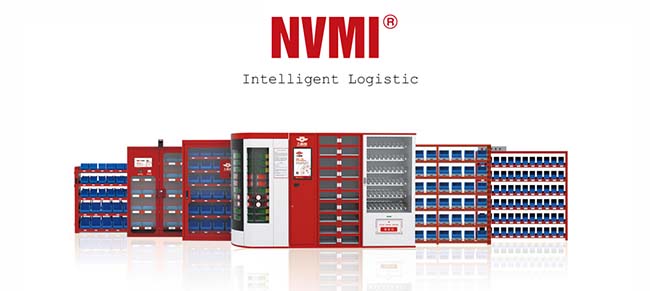
The NVMI-H open smart cabinet is designed for direct picking with connected weight-sensing bins. Its current product information describes a single-sided arrangement with 25 sensing modules and a double-sided arrangement with 50. These are published configurations, not a substitute for checking the proposed material-to-bin allocation and working space.
The NVMI-D enclosed smart cabinet supports a configured identity and permission workflow. Its published standard sensing configuration contains 30 modules. If an RFQ requires authorized issue, describe which users need access, what material groups they may collect and which identity method is preferred. The proposed method and permissions should appear explicitly in the supplier response.
The NVMI-X mobile open smart cabinet is designed for flexible placement and direct access. If mobility is required, list the intended operating points, movement frequency, routes, power arrangements and procedure for updating the cabinet's recorded location. Open mobile storage should not be assumed to provide the same controlled-access workflow as an enclosed model.
Ask how the proposed configuration can be changed when SKUs are added, removed or reassigned. Require the supplier to distinguish changes that a trained site administrator can make from those requiring hardware, software work or supplier support. Avoid an unqualified request for “unlimited expansion”; specify the likely next group of materials and locations instead.
4. Define Users, Permissions and Material-Issue Records
List every user group that will interact with the cabinet: production operators, warehouse staff, maintenance teams, supervisors, administrators, suppliers or temporary personnel. For each group, state whether it may pick, replenish, inspect, correct stock or change permissions. If authorization is required, specify whether access applies to the cabinet as a whole or to particular materials under the proposed design.
Describe the existing credentials, if any, and ask how the proposed system would use them. Do not treat an ID card, QR code or biometric method as interchangeable without reviewing enrollment, permission management and an alternative procedure when a user cannot authenticate. The final access method must be confirmed as part of the project configuration.
State what a complete issue record should contain. Possible fields include user identity, time, cabinet, item code, detected quantity change, unit of measure and transaction status. If a work order, department or cost center is required, explain where that information comes from and when the user provides it. Request sample reports or a field list so the buyer can check the actual output.
Include exception cases. What happens if a door opens without a pick, several items are taken in one session, an employee returns unused material, or a credential is lost? How is an urgent collection handled when the normal identity process is unavailable? The RFQ should request the proposed workflow for each relevant case rather than assuming every event is an ordinary withdrawal.
5. Describe Replenishment, Returns and Stock Corrections
Specify who owns each step after a low-stock condition is detected. The process may involve a warehouse employee, a production material handler or an approved supplier. State who reviews an alert, releases stock, transports it, fills the bin and confirms the addition. Identify the source location so a transfer into the cabinet is reflected in the correct balances.
Provide the proposed approach to minimum stock levels and their review. If historical consumption data is available, share it with its time period and unit of measure. Ask the supplier how thresholds are configured and which roles can change them. The RFQ should request alert behavior and reporting, but it should not demand guaranteed elimination of shortages; material availability also depends on supply and response procedures.
Define how returns and corrections are handled. A user may put material back into the bin, a replenisher may discover a quantity mismatch, or an item may be assigned to the wrong location. Ask how the system records the change, who can approve a correction and how the original event remains available for review.
If vendor-managed inventory or consignment stock is part of the project, state the commercial and operational responsibilities separately. Who owns the material before use? Who may view stock information? What event triggers replenishment or settlement? These terms belong in the agreed supply process and should not be inferred from the presence of a smart cabinet.
6. Replace “ERP Compatible” With an Interface Specification
Many RFQs ask whether a smart cabinet can integrate with ERP or WMS. That question is too broad to produce comparable answers. Identify the actual customer systems, their owners and the data to be exchanged. For each data object, state the direction of transfer, required fields, update timing and process for failed or duplicate messages.
Start with the item master, location master and user accounts. Then define inventory balances, material issues, refills, transfers and alerts as needed. Decide which system is authoritative for each record. If ERP holds the approved item description, for example, specify how a corrected description reaches the cabinet platform. If the cabinet records a pick, identify where and when that event should appear in the customer system.
Ask suppliers to explain the proposed interface method and project work in their response. Request a sample data mapping, a description of testing responsibilities and the method for investigating failed exchanges. A statement that an API is available does not confirm compatibility with the buyer's software or that the interface is included in the quoted scope.
Include account and data access requirements. Which teams may see cabinet-level usage, user-level records or stock across several facilities? How will permissions be administered? If the project spans regions or business units, specify the reporting boundary without assuming all users should see all records.
7. Include a Site Survey and Installation Requirements
Attach a marked layout showing the intended cabinet position, nearby workstations, access routes and replenishment path. Measure the available area, including room for users to collect materials and staff to refill the cabinet. Note doors, equipment movement and any site rules that affect installation. A cabinet's stated dimensions do not describe all the working space required around it.
Identify available power and connectivity at the exact operating position. Ask the supplier to confirm the requirements for the proposed configuration and to state who is responsible for preparing the site. For a mobile arrangement, provide every planned operating location rather than only the first position.
Document the site's normal shifts and any periods when the cabinet must be available without warehouse staff present. Identify the local person who can support user enrollment, material setup and first-line investigation of an inventory difference. These operating conditions can affect the solution as much as the cabinet's physical design.
8. Ask Every Supplier to Respond in the Same Format
A structured response makes technical and commercial proposals easier to compare. Ask the supplier to complete each requirement with one of four clear responses: included in the proposed standard configuration, available through a specified option, requiring project-specific development, or not offered. Request an explanation wherever the proposed method differs from the buyer's requested workflow.
| RFQ section | Buyer provides | Supplier should return |
|---|---|---|
| Materials | SKU data, sizes, weights and handling rules | Suitability review and proposed bin allocation |
| Cabinet | Access policy, location and available space | Model, configuration, layout and site requirements |
| Users | Roles, credentials and issue-record needs | Access workflow, permissions and exception process |
| Inventory | Refill ownership and transaction definitions | Alert, refill, return and correction workflow |
| Integration | Systems, data objects and owners | Interface scope, mapping approach and test responsibilities |
| Deployment | Site plan, pilot scope and acceptance goals | Implementation tasks, dependencies and verification plan |
Keep the proposed hardware, software, configuration, implementation and ongoing services identifiable in the offer. Ask for the assumptions behind the proposal and a list of buyer responsibilities. Procurement can then compare the complete project scope rather than cabinet names alone. Commercial terms such as price, delivery, warranty and service commitments should be supplied in the actual quotation, not assumed from general product information.
9. Define Pilot Tests Before Placing the Order
Acceptance criteria should demonstrate the agreed use case with real materials. Prepare test items that represent small and larger parts, different pick quantities and any packaging variations. Verify that each fits its assigned unit and that the inventory record responds as specified when stock is added and removed.
Test user permissions with people from different roles. Confirm an authorized collection, an attempted action outside a user's permission, a refill and a stock correction. Review the resulting records together with operations and IT. If an external interface is part of the scope, test the data fields and exception handling in the agreed customer environment.
Include a low-stock scenario and follow it through the complete response: alert, review, preparation, delivery and confirmed refill. Check what happens after a temporary connection problem according to the approved system design. Record any differences between the agreed workflow and the observed result, assign an owner and retest after correction.
Finally, agree on the handover package. It should identify the installed configuration, item-to-bin mapping, user roles, operating instructions, administrator training, support contacts and unresolved items. A signed acceptance should reflect the tested scope, not a general impression that the screen and doors function.
Copy-Ready RFQ Information Checklist
- Project objective: State the material-management problem and intended pilot outcome.
- Locations: List each proposed site, work area and available installation space.
- Material attachment: Provide item codes, descriptions, dimensions, weights, units, usage and stock quantities.
- Cabinet workflow: State open or controlled access, fixed or mobile placement, and expected users.
- Transactions: Define issue, refill, return, transfer and correction requirements.
- Replenishment: Identify the stock source, responsible team, alert recipients and response steps.
- Data and systems: Name existing applications and specify required records and interfaces.
- Site conditions: Provide layout, power, connectivity, operating hours and local constraints.
- Supplier response: Request model and bin layout, included functions, options, exclusions and assumptions.
- Acceptance: List representative materials, users and transactions to be tested.
Frequently Asked Questions
Can an RFQ be issued with only the number of SKUs?
It can start a discussion, but it is insufficient for a reliable cabinet configuration. The supplier also needs item dimensions, weights, storage form, pick quantity, planned stock and access rules to assess bin fit and the proposed workflow.
Should the buyer specify a cabinet model in advance?
If a model has already been assessed, include it as a reference and explain the reasons. Otherwise, specify the material and operating requirements, then ask suppliers to justify their proposed configuration. State which features are mandatory so alternatives can be compared fairly.
Is “automatic replenishment” a complete requirement?
No. Specify the event that starts the process, who receives an alert, who approves the action, where replacement stock comes from and how the refill is confirmed. The cabinet provides information within a wider supply workflow.
What access information should be included?
List user groups, their permitted actions, existing credentials and the records needed after collection. Describe how temporary users, lost credentials and unsuccessful authentication should be handled. Confirm the proposed method and modules for the specific project.
What should be requested for ERP or WMS integration?
Name the applications and identify the exact item, user, location and transaction fields to exchange. Ask for the proposed interface, direction and timing of each exchange, error handling, test environment and responsibilities on both sides.
Can the same RFQ cover a pilot and a later rollout?
Yes, if the two scopes are separated. Define the pilot locations and acceptance tests first. Then describe the possible additional sites, expected differences and information needed for a future expansion proposal. Do not present an unapproved later configuration as part of the initial installation.
References & Sources
- Bear Bit NVMI website: connected inventory monitoring, material-use records and replenishment planning.
- Bear Bit NVMI-H product information: open-access design and published sensing configurations.
- Bear Bit NVMI-D product information: enclosed storage, configured access and standard sensing configuration.
- Bear Bit NVMI-X product information: mobile open-access material placement.
Conclusion: Make the RFQ Testable
A smart cabinet requirements checklist is most useful when every requirement can be linked to a material, user, location or transaction. Give suppliers enough data to design a credible bin arrangement and state which processes the first cabinet must support. Request clear responses on configuration, access, replenishment, integration and acceptance so the proposals can be reviewed against the same industrial workflow.
To prepare an NVMI project review, share your SKU list and material categories, item dimensions and weights, current picking and replenishment process, expected user count, access-control needs, available floor space, mobility requirements, integration scope, deployment locations and target KPIs. These inputs provide a practical basis for discussing cabinet configuration and an RFQ response.