Point of use smart cabinet vs tool crib is a practical deployment decision for manufacturers trying to improve how fasteners, C-parts, MRO consumables, tools, and production materials reach the people who need them. A central tool crib concentrates inventory, staff, and control in one location, while a point-of-use smart cabinet moves selected materials closer to production, maintenance, or assembly workstations and connects those materials with digital inventory information.
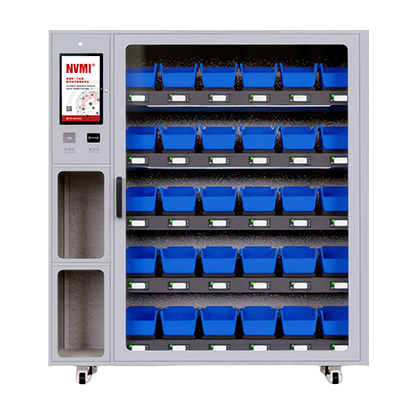
Neither approach is automatically better for every material. Centralized storage can simplify physical control and support specialist supervision, while point-of-use inventory can reduce repeated trips to a storeroom and make high-frequency materials available closer to consumption. For many factories, the most practical design is a hybrid model: central storage remains important for reserve inventory, specialized tools, and slow-moving items, while selected high-frequency SKUs are positioned in NVMI smart cabinets close to production.
Point of Use Smart Cabinet vs Tool Crib: Where Should Industrial Inventory Be Stored?
Quick Answer
A point-of-use smart cabinet is usually worth evaluating when workers repeatedly leave their workstation to collect the same fasteners, C-parts, PPE, MRO supplies, or production consumables. Moving those materials closer to consumption can simplify the physical issue process while smart inventory technology maintains visibility into stock levels and replenishment needs.
A central tool crib remains useful when the plant needs concentrated control over specialized tools, infrequently used materials, large items, calibration-sensitive assets, reserve inventory, or materials that require direct supervision.
The decision should therefore be based on material behavior. High-frequency, predictable, compact materials are often strong candidates for point of use storage. Slow-moving, unusual, oversized, or tightly controlled materials may remain better suited to centralized storage. Access requirements, floor space, user count, supplier replenishment, inventory visibility, and system integration should also be considered.
Key Takeaways
- Point-of-use smart cabinets position selected inventory closer to where employees actually consume it.
- A central tool crib concentrates materials and control in a common warehouse or tool-room location.
- High-frequency C-parts, fasteners, and recurring consumables can be strong point-of-use candidates.
- Specialized tools, slow-moving materials, oversized items, and reserve inventory can remain centralized.
- NVMI-H supports open-access inventory for fast material collection.
- NVMI-D supports enclosed storage, authorization, and transaction monitoring where tighter control is required.
- NVMI-X supports mobile inventory when material locations need to change with production requirements.
- A hybrid architecture can combine centralized control with decentralized digital inventory.
Table of Contents
- Define the two storage models
- Compare worker and material movement
- Compare inventory control
- Decide which materials belong at point of use
- Decide what should remain in the tool crib
- Choose the right NVMI configuration
- Plan replenishment between central and line-side inventory
- Build a hybrid architecture
- Choose where to deploy first
- Use a practical selection checklist
- Frequently asked questions
What Is the Difference Between Point-of-Use Inventory and a Central Tool Crib?
In this comparison, a central tool crib refers to a centralized storeroom, tool room, or controlled issue area where employees collect materials from one common location. Exact tool-crib procedures differ between factories, but the defining characteristic is physical centralization.
A point-of-use smart cabinet takes a different approach. Selected inventory is positioned near a production line, maintenance area, assembly workstation, or other consumption point. Smart inventory equipment then provides digital information about material quantities, usage, shortage conditions, or replenishment activity according to the deployed configuration.
The NVMI intelligent material-management approach combines smart inventory equipment with SaaS-based inventory management. The documented functions include real-time inventory updates, material usage records, shortage reminders, replenishment records, and visual material-status monitoring.
The distinction is therefore not simply "small cabinet versus large storeroom." It is centralized material access versus distributed inventory positioned closer to actual use.
Worker Travel Is a Major Difference
Consider a production employee who uses several types of bolts, nuts, washers, or clips throughout a shift. If every replenishment requires a trip to a central tool crib, the material route begins with the employee leaving the production area, traveling to the storeroom, completing the issue process, and returning to the workstation.
For an item collected once per month, that movement may be insignificant. For a component collected repeatedly by many employees, the same workflow can become a recurring operational task.
Point-of-use inventory changes that route by placing suitable SKUs closer to consumption. Instead of asking whether every employee should walk to the inventory, the project asks whether frequently used inventory should be moved closer to the employees.
This does not mean every material should be decentralized. The value of point-of-use deployment increases when pickup frequency is high, the items are compact enough for local storage, and the material is predictable enough to replenish using an agreed process.
Point of Use Smart Cabinet vs Tool Crib for Material Access
| Decision Area | Point-of-Use Smart Cabinet | Central Tool Crib |
|---|---|---|
| Material location | Close to production or maintenance users | Centralized in one primary issue area |
| Employee travel | Can reduce repeated trips for selected SKUs | Users travel to the centralized location |
| Typical material profile | Frequently consumed, compact, repeatable items | Broad inventory, specialized tools, reserve stock, irregular items |
| Access model | Open or authenticated depending on equipment | Depends on the plant's storeroom procedure |
| Inventory visibility | Can provide digital point-of-use inventory data | Depends on the existing warehouse or tool-room system |
| Replenishment | Requires planned refill from supplier or upstream inventory | Receives and manages centralized stock |
| Best use | Reducing distance between selected inventory and consumption | Maintaining centralized control of broader or specialized inventory |
Decentralizing Inventory Does Not Mean Losing Control
One concern with line side inventory is that distributing materials across the factory can make inventory harder to manage. Conventional shelves placed beside production may solve the travel problem while creating another challenge: managers may no longer know exactly how much material remains at each location.
This is where smart inventory differs from ordinary decentralized shelves. The purpose is to combine point-of-use availability with digital inventory visibility.
Bear Bit's product documentation describes real-time inventory monitoring, automatic quantity updates, material usage records, and automatic shortage information when inventory falls below configured conditions. These functions can help make distributed inventory visible without requiring every line-side location to depend solely on manual counting.
Managers can then treat the smart cabinet as a controlled inventory node rather than an isolated shelf.
Which Materials Should Move to Point-of-Use Storage?
Material segmentation should come before cabinet installation. The strongest point-of-use candidates generally combine frequent consumption with a manageable physical footprint and a repeatable replenishment process.
Fasteners and C-parts: Bolts, nuts, washers, screws, clips, and similar standardized components can be good candidates when employees repeatedly collect them during production.
Production consumables: Materials used continuously by a specific production line can be positioned closer to the workstation if local storage supports the required quantity and replenishment cycle.
Frequently used MRO materials: Common maintenance consumables may also benefit from decentralized access, particularly when technicians otherwise make repeated trips to the central storeroom.
Selected PPE or indirect materials: Where appropriate to the plant's access policies, frequently required indirect materials can also be considered.
A useful candidate analysis should include:
- SKU identification and specification
- Historical pickup frequency
- Historical usage quantity
- Typical quantity taken per transaction
- Item dimensions and weight
- Number of users
- Current storage location
- Material criticality
- Required access control
- Supplier or internal replenishment lead time
What Should Stay in the Central Tool Crib?
Point-of-use inventory should complement rather than automatically eliminate centralized storage. Some materials remain more practical to control in a common location.
Low-frequency items: If a component is rarely used, duplicating it across several line-side locations can create unnecessary stock.
Specialized tools: Tools used by several departments may be more efficiently shared from a central location, particularly when return control, calibration, or inspection procedures are required.
Oversized materials: Large components may not fit practical smart-cabinet dimensions and can consume valuable production-floor space.
Reserve inventory: A central warehouse or tool crib can hold the upstream quantity used to replenish smaller point-of-use inventory positions.
Irregular project materials: Items tied to temporary projects or unpredictable demand may not justify permanent line-side placement.
The objective is not maximum decentralization. It is locating each material at the point that best supports access, control, storage efficiency, and replenishment.
How NVMI-H, NVMI-D, and NVMI-X Support Different Point-of-Use Requirements
Different production areas can require different access models, which is why point-of-use deployment should not automatically mean one cabinet type.
NVMI-H for rapid open collection: NVMI-H offers a single-sided open-access configuration with 25 weight-sensing modules and a double-sided configuration with 50. It supports S, M, and L smart units and is designed for warehouse, production-line, and transit material management. Its open collection model can suit high-frequency materials where pickup speed is important. Review the NVMI-H open smart inventory configuration.
NVMI-D for controlled point-of-use materials: Some materials need to be close to employees without becoming openly accessible. NVMI-D is documented as an enclosed 30-unit model with authorization and monitoring capabilities. This makes it relevant where point-of-use availability must be combined with stronger access control. See the NVMI-D enclosed smart inventory configuration.
NVMI-X for changing workstations: A point-of-use location does not always remain in the same place. NVMI-X provides mobile open storage that can move according to workstation or production-layout requirements. Its dimensions and module configuration are confirmed for each project. The product documentation describes mobility by manual pushing or integration into suitable material-delivery workflows, subject to project configuration. Review the NVMI-X mobile smart inventory configuration.
Point-of-Use Inventory Needs an Upstream Replenishment Process
Moving inventory closer to production does not remove the need for a central replenishment strategy. In fact, decentralized storage makes replenishment discipline more important because several local inventory points may now depend on an upstream source.
A practical workflow can be:
- The central warehouse, supplier, or designated source maintains reserve inventory.
- A production employee collects material from the point-of-use cabinet.
- The local inventory position is updated.
- The system identifies a shortage or replenishment condition according to the configured policy.
- The responsible warehouse team or supplier receives the replenishment information.
- Material is moved from the upstream source to the point-of-use cabinet.
- The incoming quantity is recorded.
This creates a two-level inventory architecture: reserve inventory upstream and working inventory close to consumption.
The exact responsibility should be defined during implementation. Some factories may replenish point-of-use cabinets from their internal warehouse. Others may include suppliers in the replenishment process. The appropriate workflow depends on commercial responsibility, inventory ownership, logistics arrangements, and system design.
Why a Hybrid Model Can Be More Practical Than Replacing the Tool Crib
For many factories, the strongest deployment is not point-of-use inventory instead of a central tool crib. It is point-of-use inventory connected to a central tool crib or warehouse.
This hybrid model can separate materials according to their behavior:
- High-frequency C-parts remain close to production.
- Controlled high-use materials can be stored in enclosed line-side cabinets.
- Specialized or rarely used tools remain centralized.
- Reserve quantities remain in the warehouse or tool crib.
- Mobile inventory serves temporary or changing production areas.
In this architecture, the central location becomes an upstream inventory and exception-management point rather than the only place employees can obtain every material.
The factory can then decide which transactions should happen centrally and which should happen near the point of use.
Point-of-Use Storage Requires Floor-Space Planning
Line-side space is valuable. A cabinet that reduces worker travel but obstructs production flow or occupies excessive workspace may create a different operational problem.
Before deployment, map:
- Available space beside the production line
- Operator movement
- Forklift and AGV routes
- Emergency paths
- Material delivery routes
- Electrical and networking requirements
- Required stored quantity
- Cabinet access and replenishment clearance
The initial SKU list should then be matched to the available storage footprint. Frequently used items with compact dimensions may deserve the highest priority when line-side space is constrained.
Where Should You Deploy First?
The first point-of-use smart cabinet should be installed where the project can test a meaningful material problem without creating unnecessary implementation complexity.
A good pilot area may have:
- Repeated trips to a central tool crib
- A manageable group of high-frequency SKUs
- Reliable historical consumption data
- Clearly defined users
- A stable production or maintenance workflow
- Known shortage or replenishment pain points
- A supplier or warehouse team ready to support replenishment
The pilot should compare the new process with a documented baseline. Relevant measures may include issue time, stockout events, replenishment response, inventory visibility, transaction completeness, or employee travel associated with material collection. Targets should be established by the customer and should not be treated as guaranteed NVMI outcomes.
Point-of-Use Smart Cabinet vs Tool Crib Selection Checklist
| Question | Point-of-Use Candidate | Central Storage Candidate |
|---|---|---|
| Is the material used frequently? | Strong | Possible |
| Is the item compact enough for line-side storage? | Strong | Not required |
| Do employees repeatedly travel to collect it? | Strong | Weak |
| Is demand highly irregular? | Review carefully | Often stronger |
| Is the item oversized? | Usually weaker | Often stronger |
| Does the item require individual access control? | Use enclosed smart cabinet | Central controlled storage also possible |
| Must the storage point move with production? | Use mobile smart inventory | Weak |
| Is it reserve inventory? | Usually no | Strong |
Information to Collect Before a Point-of-Use Deployment
- Total candidate SKU count
- Material categories
- Item dimensions and weight range
- Current pickup frequency
- Typical pickup quantity
- Current tool-crib or warehouse workflow
- Number of users and shifts
- Required access-control level
- Available line-side floor space
- Current employee material-collection route
- Replenishment responsibility
- Supplier participation requirements
- Mobility requirements
- Required ERP, MES, WMS, or supplier-system data exchange
- Target pilot KPIs
Frequently Asked Questions
Should Point-of-Use Smart Cabinets Replace the Central Tool Crib?
Not necessarily. A hybrid model can keep reserve stock, specialized tools, slow-moving materials, and oversized items centralized while moving selected high-frequency materials closer to production.
Which Materials Are Best for Point-of-Use Storage?
Strong candidates often include compact, frequently consumed materials with repeatable usage, such as selected fasteners, C-parts, production consumables, and MRO supplies. Actual SKU behavior should be reviewed before deployment.
How Do You Control Materials at the Point of Use?
The control method depends on the material. Open smart inventory can prioritize fast collection and inventory visibility, while enclosed smart cabinets can add user authentication and transaction monitoring for restricted materials.
Can Point-of-Use Smart Cabinets Be Replenished From a Central Tool Crib?
Yes. A central warehouse or tool crib can act as the upstream reserve source, while smart cabinets hold working inventory close to production. The plant should define the replenishment trigger, responsible team, and refill-confirmation process.
What If the Production Layout Changes Frequently?
A mobile smart inventory configuration can be evaluated where material storage needs to move with workstations or production requirements. NVMI-X is designed for this type of flexible deployment.
How Should a Manufacturer Decide Where to Deploy First?
Start with an area that has repeated material-collection activity, a manageable number of suitable SKUs, clear users, measurable pain points, and a defined replenishment process. A controlled pilot makes it easier to evaluate the new workflow before expansion.
References & Sources
- Bear Bit NVMI product documentation: NVMI-H single-sided (25-module) and double-sided (50-module) open configurations, NVMI-D enclosed 30-module configuration, and NVMI-X mobile configuration with project-specific specifications.
- Bear Bit NVMI material-management documentation: real-time inventory monitoring, material usage records, shortage reminders, replenishment information, and SaaS-based material visibility.
- In this article, central tool crib refers generically to a factory's centralized storeroom or tool-room issue model. Specific staffing, issue, tool-return, and access procedures vary by manufacturer and should be mapped during project planning.
- Project-specific integration, equipment capacity, user permissions, replenishment responsibility, and physical layout should be technically confirmed before deployment.
Conclusion: Put High-Usage Materials Closer to Consumption Without Losing Inventory Visibility
Point of use smart cabinet vs tool crib is not an all-or-nothing choice. A central tool crib provides a practical location for reserve inventory, specialized tools, irregular materials, and centralized control. Point-of-use smart cabinets can bring selected high-frequency inventory closer to production while maintaining digital inventory and replenishment information.
The most effective architecture can combine both models. NVMI-H can support rapid open collection of frequently used materials, NVMI-D can provide controlled access near the point of use, and NVMI-X can support work areas where material locations need to move with production.
To evaluate the right deployment model for your factory, prepare your SKU count, material categories, item size and weight range, current tool-crib workflow, pickup frequency, user count, required access control, available floor space, mobility requirements, replenishment responsibilities, integration scope, deployment locations, and target KPIs. These inputs provide the foundation for deciding which inventory should remain centralized and which materials should move closer to the point of use.