Smart cabinet access control methods should be chosen around the material, the user and the work that happens at the cabinet. A fastener bin beside a production line may need immediate access for many operators. A shared cabinet containing controlled maintenance supplies may need to verify who opened it and record the associated material movement. Those are different workflows, even when both locations need accurate inventory information.
Badge, QR code, barcode, fingerprint and facial recognition are possible ways to identify a user or initiate an access request. They are not interchangeable. A badge may be convenient when employees already carry one. A QR code may fit a phone-based process. A biometric method introduces additional enrollment, usability and privacy questions. Before selecting a reader, a buyer should decide whether the cabinet needs an enclosed door, what action must be attributed to a person and how access rights will be managed over time.
Quick Answer
For frequently used, low-restriction materials, start by assessing whether open access with inventory monitoring is sufficient. If users must be authorized before reaching the materials, assess an enclosed smart cabinet and define the access workflow first. Then compare identification methods against existing employee credentials, shift conditions, visitor access, privacy requirements and the records needed after each pick. NVMI-D is the enclosed option in Bear Bit's current range; its product design lists QR code, ID card and face-recognition modules, with the selected method and permissions confirmed for each project. Barcode and fingerprint workflows should be discussed as project requirements rather than assumed product features.
Key Takeaways
- Decide whether material access must be physically restricted before comparing identification technologies.
- Separate identifying a user, authorizing cabinet access and recording a material issue. One scan does not automatically complete all three tasks.
- Assess badge or ID card use against the credentials already issued at the site.
- Define whether a QR code identifies a person, a task, a material or a one-time transaction; these lead to different system designs.
- Treat barcode and fingerprint readers as project-specific requirements unless their availability is confirmed in the agreed NVMI configuration.
- Plan enrollment, lost-credential handling, shift changes and an alternative access procedure before deployment.
Table of Contents
- Start with the material-access workflow
- Compare the five access methods
- Match access needs to the cabinet design
- Design permissions and issue records
- Use a site-selection checklist
- Test the method during a pilot
- Frequently asked questions
Start with the Material-Access Workflow
A smart cabinet access control project should begin with a short description of what happens during a normal shift. Who approaches the cabinet? What do they collect? How often do they return? Who replenishes the bins? Is an employee allowed to take any stocked item, or only items assigned to a role, production order or department?
For a line-side stock point holding commonly used fasteners, the main problem may be stock visibility rather than restricted access. Requiring every operator to sign in before taking a small part could add steps to a high-frequency task. For a maintenance store with shared supplies and controlled issuance, the organization may need a defined user identity and permission decision before a door opens. The right answer follows the material policy, not the availability of a particular scanner.
Three decisions that are often confused
Identification establishes which account or credential is presented. Authorization checks what that account is permitted to do. Issue recording associates a stock change with a transaction or user record. A project should specify each decision separately. For example, scanning a code to find a part is not necessarily the same as verifying permission to open an enclosed cabinet.
Classify the materials before selecting hardware
Group candidate SKUs by access requirement, frequency of use, physical size and replenishment process. Ask whether restrictions apply to the entire cabinet, individual compartments or particular transactions. If different materials need different levels of control, one common door permission may be too broad. Conversely, an authorization step for every pick may be unnecessary for unrestricted consumables. Include contractors, temporary staff and replenishment personnel in this review; their access needs can differ from those of regular operators.
How to Compare Smart Cabinet Access Control Methods
The table below is a workflow comparison, not a promise that every method is available on every NVMI model. Confirm reader hardware, software behavior and integration scope during project specification.
| Method | Where it may fit | Questions to resolve |
|---|---|---|
| Badge or ID card | Sites with established employee cards and regular authorized users | Which card technology is used? Can credentials be linked to user roles? How are lost or inactive cards handled? |
| QR code | Phone-based, work-order or transaction-led processes | Is the code assigned to a person, task or transaction? Can it be reused or shared? What happens when a phone is unavailable? |
| Barcode | Processes already built around printed employee, job or material labels | What exactly is being scanned? Is identity verification also required? Is a suitable reader part of the proposed configuration? |
| Fingerprint | Projects specifically evaluating biometric identification | Is the module available for this project? How will enrollment, failed reads, privacy review and an alternative method work? |
| Facial recognition | Projects that have reviewed biometric use and want hands-free identification | What are the actual operating conditions? How will users enroll, challenge a mismatch and use an alternative method? |
Badge or ID card: use an established credential carefully
An existing staff card can make cabinet access familiar to employees. The important question is whether the proposed cabinet can recognize the site's actual card type and map it to the correct user account. “Card supported” is not a complete interface specification. Ask for the card technology, enrollment method, permission synchronization and procedure for replacing a lost card.
Shared cards undermine user-level issue records. If several people use one credential, the system may record the credential accurately without identifying the person who collected the item. A pilot should therefore test normal employees, contractors and supervisors separately, along with the process for removing access when someone changes roles or leaves the site.
QR code: define what the code represents
A QR code can carry or reference different kinds of information. One project may use a user-specific credential; another may use a code associated with a work order. A code printed beside a bin may simply help locate or identify material. These designs should not be described as the same authentication method.
Ask whether the code is static or generated for a specific session, how it is issued, whether it can be forwarded and what system checks after scanning. If the workflow depends on a personal phone, assess phone availability, battery life, network conditions and the site's device policy. Where codes are printed, decide who can create replacements and how old codes are withdrawn. The permission check should happen in the agreed workflow; reading a code alone does not establish that a user is authorized.
Barcode: distinguish item identification from user access
Barcodes are useful in many industrial material processes, but their role must be explicit. Scanning a label on a box can identify the SKU. Scanning a badge barcode may identify an employee account. Scanning a work-order barcode may provide transaction context. None of these automatically proves that the employee may open a cabinet or take a restricted item.
If barcode access is requested, provide sample label formats and explain the intended scanning sequence. Confirm reader compatibility and software mapping with the supplier before including barcode access in an approved specification. In the current NVMI-D product description, barcode is not listed among the highlighted QR code, ID card and face-recognition modules, so it should be treated as a configuration question.
Fingerprint: plan for enrollment and exceptions
Fingerprint identification may appear convenient because users do not need to carry a separate card. In an industrial setting, however, the buying team should test the actual working conditions. Gloves, hand contamination, injuries and the position of the reader can affect how practical a touch-based step feels during a shift. The team also needs a procedure for users who cannot enroll or cannot complete a read.
Biometric information needs a defined purpose, access policy and handling process. Ask where enrollment data is processed and stored, who administers it, how a user record is removed and which alternative method is available. Those answers should be reviewed with the site's responsible IT, security and privacy teams. Fingerprint support must be confirmed for the proposed cabinet rather than assumed from the general category of smart cabinets.
Face recognition: assess the complete operating environment
Face recognition can support an identification step without requiring a user to touch a reader. Suitability still depends on the installation and the agreed implementation. Camera position, lighting, protective equipment, user enrollment and the response to an unsuccessful match all deserve testing at the intended cabinet location.
The current NVMI-D enclosed smart cabinet page lists a face-recognition module in its product design. That does not by itself define enrollment policy, identity assurance, local privacy obligations or the exact access method that will be supplied in every project. Specify these points before approval and retain a practical alternative for users who cannot use the biometric route.
Match the Access Requirement to the Cabinet Design
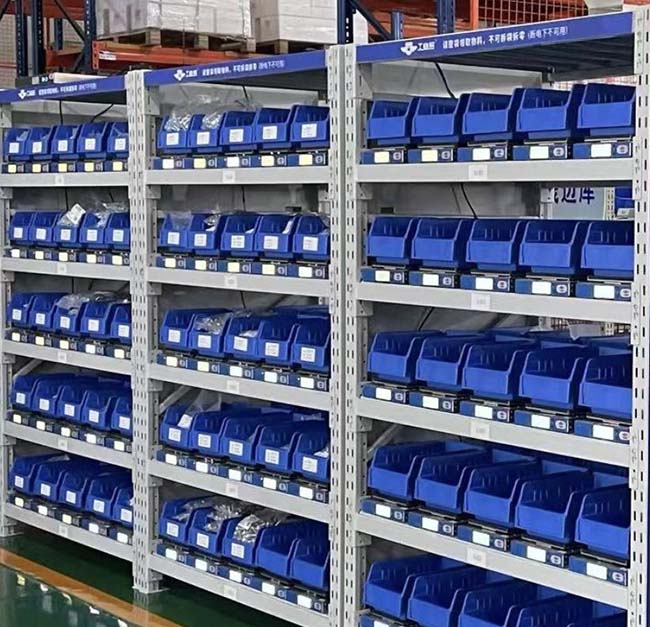
Access control starts with the enclosure. The NVMI-H open smart cabinet is designed around direct access to material bins and connected inventory information. Its published configurations include single-sided and double-sided arrangements. This can suit frequently used materials where physical restriction is not the primary requirement.
The NVMI-D enclosed smart cabinet combines enclosed storage, identity verification and weight-sensing units. Its current product page describes a 30-module standard sensing configuration and states that the access method and permissions are confirmed for the project. It is the more relevant starting point when the requirement is to verify a user before allowing access to a shared material store.
The NVMI-X mobile open smart cabinet focuses on flexible placement and direct access near changing work areas. Mobility should not be confused with restricted access. If a mobile work area also needs authorization before material collection, document both needs and have the proposed architecture reviewed rather than assuming an open mobile cabinet will provide an enclosed-cabinet workflow.
Choose the cabinet around the actual SKU list, bin arrangement, item size and weight, access policy, floor space and movement pattern. A method that works well at a fixed maintenance store may be inconvenient at a busy line-side location. A site may also use different cabinet types for different material groups.
Design Permissions and Material-Issue Records Together
After a user presents a credential, what is the system supposed to allow? A useful permission matrix identifies user groups, cabinet locations, permitted materials, replenishment rights and administrative rights. Production staff may collect assigned consumables. A replenishment team may add stock and correct receiving records. Supervisors may review exceptions. Administrators may enroll users and change permissions. These responsibilities should be documented before the cabinet goes live.
Define the event record as carefully as the access decision. Depending on the agreed workflow, a buyer may need the user ID, time, cabinet, material, detected quantity change and transaction status. Also decide how to handle a door opening with no pick, multiple items taken during one session, stock added by a replenisher and an inventory correction. A recorded cabinet opening and a confirmed material issue are different events.
Integration requirements should state which system owns user accounts, material master data and permissions. If ERP, WMS, MES or another system will exchange data with NVMI, document the specific fields, direction, timing and exception handling. The existence of an interface option does not mean that every customer system is connected without project work.
Smart Cabinet Access Selection Checklist
- Material policy: Which SKUs require restricted access, and why?
- Daily use: How many users, shifts and expected collection events are involved?
- Credential base: Do users already have cards, managed phones or other approved credentials?
- Roles: Who may collect, replenish, audit and administer each cabinet?
- Site conditions: Are gloves, protective equipment, lighting, connectivity or changing locations relevant?
- Exception route: What happens after a lost card, failed read, network interruption or urgent material request?
- Data handling: What user information is necessary, who may view it and how is it maintained?
- System scope: Which fields and events must pass to existing business systems?
- Product confirmation: Which readers, modules and software actions are included in the quoted configuration?
Test the Selected Method During a Pilot
A pilot should follow real users through an entire material transaction, from arriving at the cabinet to the inventory record appearing in the agreed system. Select representative users from different shifts and roles. Include at least one replenisher and an administrator. Use actual materials and the intended installation area, because a demonstration in an office may miss production-floor conditions.
Observe the steps rather than judging only whether a scanner can read a credential. Can a new employee be enrolled correctly? Can access be withdrawn promptly when a role changes? Does the system distinguish an authorized collection from an unsuccessful attempt? Can staff resolve a failed scan without losing the material-issue record? Does the chosen process remain workable during a busy shift?
Set pilot acceptance criteria before testing. Examples include completion of the agreed access steps, correct role permissions, the required fields in issue records and a documented exception process. These are project checks, not a claim that a particular access method guarantees a measurable improvement. Review the findings with operations, procurement and IT before extending the configuration to more materials or locations.
Frequently Asked Questions
Does every smart cabinet need user authentication?
No. The requirement depends on the materials and the control policy. An open cabinet can support direct picking and inventory visibility for appropriate materials. If the organization must verify permission before a user reaches the stock, evaluate an enclosed access workflow.
Is scanning a QR code the same as authorizing a material issue?
No. A QR code may identify a user, job, transaction or material. Authorization requires a defined permission check, and an issue record requires the agreed material movement to be captured. Specify all three steps rather than treating the scan as the complete process.
Can employees use their existing ID cards with NVMI-D?
NVMI-D's current product design lists an ID card module. Compatibility with a particular site's cards, enrollment system and permission rules must be confirmed for the project. Provide a sample credential specification during evaluation.
Are barcode and fingerprint readers standard on NVMI-D?
The current NVMI-D product page highlights QR code, ID card and face-recognition modules. Barcode or fingerprint requirements should be submitted for technical confirmation, including the reader, software workflow and final configuration.
Which method provides the best traceability?
Traceability depends on the complete workflow: a credential assigned to the correct person, appropriate permissions, an accurate material movement record and a process for exceptions. A biometric reader alone does not resolve shared accounts, stock corrections or incomplete transaction data.
Should face recognition be the only access route?
A project should assess enrollment, failed reads, operating conditions and an alternative procedure before relying on any one method. The final choice should follow the site's user and privacy requirements as well as the confirmed cabinet configuration.
Conclusion: Choose Access Around the Material Process
The best smart cabinet access control methods are those that fit the site's material policy and daily work. Start by separating open inventory monitoring from controlled physical access. Then define identity, permissions, material-issue records and exception handling. Compare badge, QR code, barcode, fingerprint and face recognition against those requirements, while confirming which methods the proposed NVMI configuration actually supports.
To plan an NVMI project, share your requirements with Bear Bit: the SKU list and material categories, item dimensions and weights, current issue and replenishment workflow, expected user count, access-control needs, existing credentials, system-integration scope, deployment locations and target KPIs. These details provide a basis for reviewing cabinet layout, user permissions and the appropriate access method.
References & Sources
- Bear Bit: NVMI-H Open Smart Cabinet — product design and open-access workflow.
- Bear Bit: NVMI-D Enclosed Smart Cabinet — enclosed workflow, listed identity modules and published configuration.
- Bear Bit: NVMI-X Mobile Open Smart Cabinet — mobile, open-access application.
- NIST SP 800-63B: Authentication and Authenticator Management — background guidance on authentication methods and their limitations; it is not a certification of an NVMI product.