Smart cabinet sizing should begin with the materials that need to be managed, not with a target number of cabinets. A project with 50 SKUs does not automatically require one 50-unit cabinet, and a project with 100 SKUs does not automatically require two. Item dimensions, stored quantity, weight, pickup frequency, replenishment interval, access-control requirements, deployment location, and the number of smart units required for each SKU can all change the final configuration.
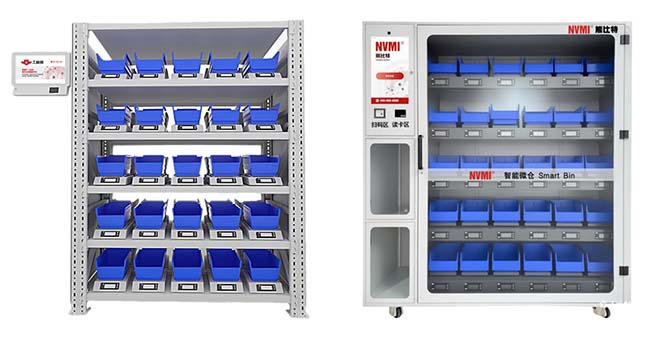
For manufacturers managing fasteners, C-parts, MRO consumables, tools, and production-line materials, the correct sizing process converts an SKU list into a physical storage plan. Each material must be matched to an appropriate bin or smart unit, the required working quantity must fit within that unit, and the resulting unit mix must then be matched to the cabinet architecture. This approach produces a more reliable specification than selecting equipment from SKU count alone.
Smart Cabinet Sizing by SKU Count, Bin Capacity and Material Flow
Quick Answer
The correct way to size an industrial smart cabinet project is to work from the SKU level upward. First, identify which SKUs belong in the smart inventory program. Next, record item dimensions, weight, required on-hand quantity, pickup frequency, replenishment pattern, and access requirements. Then assign each SKU to a suitable smart-unit size and determine whether one SKU needs one unit or multiple units. Only after this exercise should the total unit requirement be compared with the capacity and architecture of NVMI-H, NVMI-D, NVMI-X, or a multi-cabinet deployment.
NVMI-H offers a single-sided configuration with 25 weight-sensing modules or a double-sided configuration with 50. NVMI-D has 30 weight-sensing modules and controlled access. NVMI-X provides mobile open storage; its dimensions and module configuration are confirmed for each project. These figures are useful planning references, but final cabinet layout should still be technically confirmed because the physical mix of unit sizes, access controls, material characteristics, and project-specific customization can affect the configuration.
Key Takeaways
- SKU count is only the starting point for smart cabinet sizing.
- One SKU may require more than one smart unit when the required working quantity exceeds practical bin capacity.
- Item dimensions and weight must be checked before assigning a bin type.
- Replenishment frequency affects how much inventory must physically fit in each cabinet.
- High-frequency materials may require more working capacity than low-frequency materials with the same SKU count.
- Access control can change cabinet selection because enclosed NVMI-D uses a different architecture from open NVMI-H.
- Mobile NVMI-X can be considered when the storage point needs to move with production.
- Final sizing should be based on a SKU-to-bin matrix, not a simple cabinet-count estimate.
Table of Contents
- Why SKU count alone is not enough
- What material data to collect
- How to calculate practical bin capacity
- How replenishment frequency changes capacity
- How NVMI-H, NVMI-D and NVMI-X affect sizing
- How to build a smart-unit mix
- Why deployment location matters
- How to plan for future SKU growth
- Smart cabinet sizing checklist
- Frequently asked questions
Smart Cabinet Sizing Should Not Start With Cabinet Count
A common planning shortcut is to count the SKUs and divide that number by the advertised number of smart units in a cabinet. The calculation looks simple, but it can produce an unrealistic project specification.
Consider two factories with the same SKU count. Factory A manages small fasteners with frequent supplier replenishment and modest point-of-use quantities. Factory B manages larger fittings, maintenance components, and higher working quantities that must cover a longer replenishment interval. The projects may contain the same number of SKUs while requiring very different physical storage capacity.
SKU count also does not show how many locations need the material. One commonly used component may need inventory at several production areas. In that case, one SKU appears once in the material master but can require multiple physical smart units across the factory.
For this reason, the planning unit should be the SKU-location-capacity requirement, not simply the total number of material codes.
What Data Should Be Collected for Every SKU?
A reliable industrial cabinet planning exercise starts with a structured SKU file. Procurement or warehouse teams often already have part of this information, but the data should be verified against the actual material and current storage process.
| Data Field | Why It Matters for Sizing |
|---|---|
| SKU / material code | Creates a unique mapping between the material and smart unit. |
| Description and specification | Prevents similar materials from being confused during layout planning. |
| Item dimensions | Determines whether the material physically fits the selected bin. |
| Item weight | Helps verify the required load range and stored quantity. |
| Target stored quantity | Determines how much physical bin capacity is required. |
| Typical pickup quantity | Helps evaluate whether the selected storage format matches user behavior. |
| Pickup frequency | Identifies high-frequency materials that may need larger working capacity or faster replenishment. |
| Replenishment interval | Influences the amount of material that must remain available between refills. |
| Access requirement | Determines whether open or enclosed inventory is appropriate. |
| Deployment location | Determines whether the material needs warehouse, line-side, controlled, or mobile storage. |
This information should be collected before a final equipment quantity is proposed. If item dimensions, weight, or required quantity are unknown, smart cabinet capacity remains an estimate rather than a validated configuration.
Bin Capacity Means More Than Physical Volume
Bin capacity should be evaluated using several constraints at the same time. Physical volume is the most obvious one: the required quantity must fit inside the usable material container. However, weight, pickup accessibility, sensing range, packaging format, and the way components settle inside the bin can also affect the practical capacity.
A small but dense metal component can reach a weight limit before filling the physical volume. A lightweight but bulky component can fill the container while remaining well below its load limit. Irregularly shaped parts can also use storage space differently from compact fasteners.
The sizing process should therefore verify both physical fit and stored weight. A practical SKU worksheet can record the planned quantity per smart unit and then compare that quantity with the verified unit configuration.
The supplied NVMI documentation includes S, M, and L smart-unit concepts for different material sizes and load ranges. Current project specifications should be confirmed during configuration because unit design and technical parameters may be updated or customized for the actual application.
Do Not Assume One SKU Equals One Bin
One SKU can require multiple smart units for several reasons. The required quantity may exceed the practical capacity of one unit. The same material may need to serve two production areas. A high-frequency material may be intentionally distributed across several line-side locations. A replenishment process may also require more working stock than one unit can practically hold.
The opposite planning mistake is placing every existing SKU into the smart cabinet even when some materials rarely move. Smart inventory space should normally be allocated according to operational value. Frequently consumed materials, repeated manual replenishment work, stockout exposure, and point-of-use requirements are often stronger selection criteria than simply including the entire material master.
A useful planning rule is therefore:
First decide which SKUs belong in the smart inventory process. Then determine how many physical units each selected SKU actually requires.
Replenishment Frequency Directly Affects Smart Cabinet Capacity
The quantity stored in the cabinet should support the intended replenishment process. If a supplier or internal warehouse replenishes a material frequently, the point-of-use inventory may not need to hold a large quantity. If replenishment takes longer, the working quantity may need to cover a longer consumption period.
A simple planning relationship is:
Required working quantity = expected consumption during the replenishment exposure period + the approved inventory buffer.
This is a planning relationship rather than a universal inventory formula. The actual buffer should reflect material criticality, demand variation, supplier performance, and the customer's inventory policy.
Once the required working quantity is established, the project team can test whether it fits one smart unit. If it does not, there are several options: use a larger compatible unit, allocate multiple units to the SKU, increase replenishment frequency, or retain part of the quantity in an upstream warehouse.
This connection between inventory policy and physical storage is why cabinet sizing should involve procurement, warehouse, production, and supplier teams rather than being treated only as an equipment-selection task.
How NVMI-H, NVMI-D and NVMI-X Change the Sizing Decision
The NVMI product family provides different cabinet architectures for different material workflows. Current product information provides the following planning references:
| Model | Cabinet Size (W × D × H) | Weight-Sensing Modules | Bin Configuration | Primary Planning Consideration |
|---|---|---|---|---|
| NVMI-H | Single-sided: 1360 × 430 × 1900 mm Double-sided: 1360 × 860 × 1900 mm | Single-sided: 25 Double-sided: 50 | Match bin sizes to materials and the selected cabinet layout | Open-access, high-frequency material pickup |
| NVMI-D | 1730 × 700 × 1900 mm | 30 | Confirm the bin layout during project configuration | Enclosed access, authentication and controlled material issue |
| NVMI-X | To be confirmed for the project | To be confirmed for the project | To be confirmed for the project | Mobile deployment for changing production workflows |
The documented unit count should be treated as a configuration reference rather than a promise that the same number of independent SKUs will always fit every project. Material dimensions, unit mix, quantity requirements, cabinet layout, and customization should be technically confirmed.
Manufacturers can review the NVMI-H open smart inventory configuration, the NVMI-D enclosed smart inventory configuration, and the NVMI-X mobile smart inventory configuration when comparing physical deployment options.
Build a SKU-to-Smart-Unit Matrix Before Requesting Cabinet Quantity
A practical sizing worksheet should assign every proposed SKU to a candidate unit type. The objective is to convert the raw SKU list into a physical configuration.
| SKU | Item Size / Weight | Target Quantity | Access Type | Location | Candidate Unit | Units Required |
|---|---|---|---|---|---|---|
| SKU A | Customer data required | Customer data required | Open / Controlled | Warehouse / Line Side | To be confirmed | To be confirmed |
| SKU B | Customer data required | Customer data required | Open / Controlled | Warehouse / Line Side | To be confirmed | To be confirmed |
After the entire SKU list has been mapped, total the required smart units by location and access type. This provides a much stronger basis for selecting the number and type of cabinets.
For example, materials that require unrestricted high-frequency pickup may be grouped into an NVMI-H planning scope, while controlled materials are separated into an NVMI-D scope. Materials that must follow changing workstations can be evaluated separately for NVMI-X. This prevents access-control requirements from being mixed into a simple total-SKU calculation.
Separate Working Inventory From Reserve Inventory
A smart cabinet does not necessarily need to hold the entire inventory quantity for every SKU. In many industrial layouts, the smart cabinet holds working inventory close to the user while additional reserve stock remains in a warehouse, supplier-managed area, or upstream material location.
This two-level architecture can improve space planning because line-side cabinets are sized around the amount required between replenishments rather than the total material owned by the plant.
The project should define which quantity belongs at the point of use and which quantity remains upstream. The answer depends on consumption, replenishment frequency, material criticality, floor-space limits, and logistics responsibility.
The Same SKU Count Can Require Different Cabinet Numbers at Different Locations
A factory with 80 candidate SKUs in one warehouse presents a different sizing problem from a factory with the same 80 SKUs distributed across five production areas. Decentralized inventory can reduce worker travel but increases the number of physical inventory points that must be replenished.
During industrial cabinet planning, each location should therefore be treated as its own demand point. Record which SKUs are required there, how often they are collected, and how much working inventory must be available before the next refill.
Location analysis should also include available floor space, pedestrian and material-handling routes, power and network requirements, cabinet access clearance, and the route used by warehouse personnel or suppliers to replenish the cabinet.
Access Control Can Change Cabinet Quantity
Access requirements can create separate equipment groups even when the total SKU count appears to fit one cabinet. High-frequency standard fasteners may work well in open smart inventory, while selected tools or restricted MRO supplies require an enclosed cabinet.
If 40 SKUs require open access and another 20 require controlled authorization, treating them as one 60-SKU group can lead to the wrong architecture. They should first be separated by control requirement and then sized against the appropriate cabinet model.
NVMI-D supports multiple authentication options according to current product information, including password, QR code, barcode, facial recognition, fingerprint, and ID card methods. The actual authentication scope and configuration should be confirmed for each project.
Plan Capacity for Change Without Automatically Oversizing
Factories change. New SKUs are introduced, production lines are reconfigured, suppliers change, and material consumption shifts. A cabinet project should therefore consider future growth, but growth planning should be based on an identifiable requirement rather than an arbitrary percentage.
Useful questions include:
- Are new product families scheduled to enter production?
- Will additional workstations use the same material point?
- Are more MRO categories expected to enter the system?
- Will the project expand from one shift to multiple shifts?
- Will the supplier replenishment scope increase after the pilot?
- Could a mobile cabinet be more practical than reserving permanent fixed capacity?
If future requirements are uncertain, a phased rollout can be more practical than sizing the entire project around unconfirmed future demand. Validate the first group of SKUs and storage locations, then review additional capacity using actual consumption and replenishment records.
Smart Cabinet Sizing Checklist
- List the SKUs and locations included in the first phase.
- Verify item dimensions, unit weight, packaging and the quantity to be stored.
- Confirm bin fit, weight capacity, access requirements and replenishment frequency.
- Map each SKU and location to a suitable bin, allowing multiple bins where needed.
- Review cabinet dimensions, access clearance, power and network requirements.
- Confirm the final configuration with the supplier before placing an order.
Frequently Asked Questions
Does one weight-sensing module always mean one SKU?
A module is a physical sensing position, not a guaranteed SKU capacity. The bin arrangement and material requirements determine the final SKU-to-module mapping.
How many modules does NVMI-H provide?
NVMI-H offers 25 weight-sensing modules in the single-sided configuration and 50 in the double-sided configuration.
How should a mobile NVMI-X cabinet be sized?
Share the materials, quantities, workstation locations and movement requirements with our team. The dimensions and module configuration are confirmed for the project.
What is the next step?
Contact our team with your SKU list and deployment requirements to review a suitable cabinet configuration.