Smart cabinet vs smart locker is an important comparison for manufacturers deciding how to store, issue, track, and replenish fasteners, C-parts, MRO consumables, tools, and other industrial materials. Both technologies can replace parts of a manual storeroom process, but they are designed around different material-control priorities. A smart locker normally emphasizes individually secured compartments and controlled access, while a smart inventory cabinet can emphasize continuous inventory visibility, flexible storage, rapid material pickup, and automated replenishment signals.
The difference matters because industrial materials do not all move in the same way. A technician may borrow one calibrated tool and return it later, while a production operator may collect dozens of fasteners several times during a shift. Using the same physical control method for both processes can create unnecessary complexity. The correct architecture should therefore follow the material, user, transaction, and replenishment workflow rather than the product name alone.
Smart Cabinet vs Smart Locker: How to Select the Right Industrial Inventory Architecture
Quick Answer
A smart locker is usually most appropriate when individual compartments, authorized access, accountability, or return control are central requirements. It can be a logical choice for tools, higher-value items, personal equipment, controlled consumables, or materials that need to be assigned to individual users.
A smart inventory cabinet is often better suited to inventory-intensive workflows in which many SKUs must remain visible and replenishment needs to respond to actual consumption. Open smart inventory can support fast collection of high-frequency materials, while enclosed smart cabinets can combine access control with digital inventory management. Mobile configurations can also move inventory closer to changing production workstations.
The categories overlap. Some industrial smart lockers include inventory functions, and some smart cabinets provide electronic locking and authentication. Buyers should compare the actual storage structure, inventory measurement method, user workflow, replenishment process, and integration requirements before selecting a system.
Key Takeaways
- Smart lockers generally emphasize individually secured storage and controlled user access.
- Smart inventory cabinets can emphasize real-time inventory visibility, flexible material storage, and replenishment management.
- Open smart cabinets can fit high-frequency fasteners and C-parts where rapid collection is important.
- Enclosed smart cabinets can support authorization, transaction records, and stronger material traceability.
- Tool lockers can be useful when individual items must be assigned, returned, or controlled.
- Mobile smart inventory can support production layouts where material locations need to change.
- SKU count, material dimensions, pickup quantity, user count, access requirements, and replenishment logic should drive system selection.
- A factory may need a mixed architecture rather than one storage method for every industrial material.
Table of Contents
- The basic difference between smart cabinets and smart lockers
- How an industrial smart locker works
- How a smart inventory cabinet works
- Functional comparison
- Which materials fit each system
- Access control and traceability
- Inventory and replenishment management
- Open, enclosed, and mobile NVMI options
- Selection checklist
- Frequently asked questions
Smart Cabinet vs Smart Locker: Start With the Material Flow
The simplest difference is the relationship between the user and the storage location. A locker architecture normally divides storage into individually secured compartments. The user identifies themselves, gains access to an approved compartment, removes or returns the item, and the system records the access event according to the configured workflow.
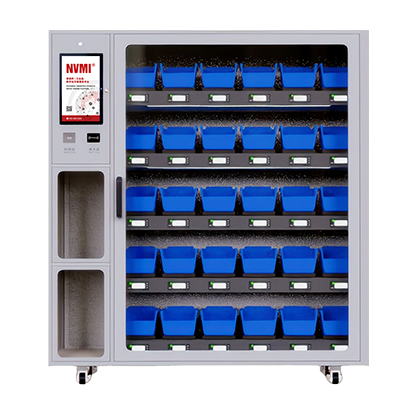
A smart inventory cabinet may instead organize many materials through intelligent bins or storage units. Depending on the configuration, the system can monitor inventory quantities as employees collect materials and can provide current stock information without requiring every individual piece to be issued through a separate locked compartment.
This distinction can significantly affect industrial workflows. For example, a worker who needs one specialized tool may benefit from an individual locker because the company wants to know who has possession of that specific asset. A worker collecting bolts, washers, or other C-parts may prioritize quick pickup and accurate remaining inventory rather than individual compartment control.
The correct architecture therefore begins with a process question: Is the primary requirement controlling possession of individual items, or maintaining visibility and replenishment across many consumable SKUs?
How an Industrial Smart Locker Typically Fits the Workflow
An industrial smart locker is useful when physical separation is part of the control process. Each door or compartment creates a defined access boundary. Depending on the specific system, users may authenticate through a badge, code, card, biometric method, or another approved mechanism before opening the relevant compartment.
This structure can support scenarios where the organization wants to control which employees can access a material or asset. It may also simplify responsibility when one compartment contains one tool, kit, instrument, or defined group of materials.
A locker-based workflow can be particularly relevant when:
- Individual items need controlled access.
- Tools or assets are expected to be returned.
- Different user groups have different permissions.
- A transaction history is required for accountability.
- The organization wants physical separation between material categories.
- High-frequency bulk collection is not the primary workflow.
However, compartment-based control can become less efficient when employees repeatedly collect large or variable quantities of small consumables. The buyer should evaluate whether the additional access steps create useful control or simply add friction.
How a Smart Inventory Cabinet Works Differently
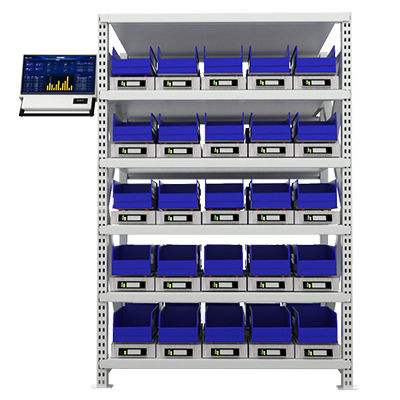
A smart inventory cabinet focuses more directly on the inventory position and material flow. Intelligent storage units can connect physical material activity with digital inventory information, allowing the system to monitor current quantities, record material usage, and identify shortage conditions.
The NVMI approach combines intelligent inventory hardware with SaaS-based material management. Product documentation describes functions including real-time inventory updates, material usage records, shortage reminders, supplier replenishment records, and visual monitoring of material status.
This makes the architecture particularly relevant to high-frequency consumables. Instead of requiring production personnel to manually report that a fastener bin is nearly empty, the inventory-management process can identify the condition from current stock data and support the next replenishment action.
A smart cabinet can therefore function as part of a broader material management system rather than simply as a secure storage enclosure.
Functional Comparison for Industrial Buyers
| Decision Area | Smart Inventory Cabinet | Smart Locker |
|---|---|---|
| Primary control focus | Inventory visibility and replenishment | Compartment access and item accountability |
| Typical storage structure | Bins, units, shelves, or intelligent compartments | Individually locked compartments |
| High-frequency consumables | Can support rapid variable-quantity pickup | Depends on compartment and transaction workflow |
| Individual asset control | Possible in controlled configurations | Often a natural fit |
| User authentication | Can range from open access to authenticated access | Usually central to the workflow |
| Real-time inventory monitoring | Can be a core function of sensing-based architecture | Depends on the specific locker system |
| Automated shortage signals | Can be generated from inventory conditions | Depends on inventory functionality |
| Mobile deployment | Available with suitable architectures | Depends on equipment design |
| Best evaluation method | Compare actual material, access, inventory, return, and replenishment requirements | |
These are general selection principles rather than universal definitions. Smart locker and smart cabinet products vary significantly between suppliers, so manufacturers should confirm the actual configuration before procurement.
Which Industrial Materials Fit Each System?
Material segmentation is the most practical way to make the decision. A factory rarely has only one type of inventory behavior.
Fasteners and C-parts: Bolts, nuts, washers, clips, and similar high-frequency materials often require repeated pickup in variable quantities. An inventory cabinet that prioritizes rapid access and current inventory visibility can be a practical fit when individual-user restriction is not the primary requirement.
MRO consumables: Maintenance supplies can fall into either category. Frequently consumed low-value items may fit smart inventory units, while restricted or higher-value MRO materials may require enclosed access.
Tools: A tool locker can be useful when the company wants to control who takes a tool and whether the asset is returned. However, an enclosed smart cabinet can also support controlled tool management when its authentication and transaction architecture matches the requirement.
Production-line materials: Components consumed directly at workstations often benefit from inventory being positioned close to use. Open or mobile smart cabinets can help support point-of-use material management when the storage location needs to prioritize access speed.
Restricted materials: Materials that require stronger authorization should be evaluated for enclosed storage, user permissions, and transaction monitoring regardless of whether the equipment is marketed as a locker or cabinet.
Access Control and Traceability Should Match the Risk
Not every SKU requires the same level of access control. Applying individual authentication to every inexpensive washer may create more operational friction than value. Conversely, leaving expensive or restricted materials openly accessible may not provide sufficient accountability.
Manufacturers should classify materials according to the level of control required:
- Open pickup with inventory monitoring
- Authorized access to the entire cabinet
- Authorization by material or compartment
- Individual issue records
- Return tracking
- User or department restrictions
- 24/7 self-service requirements
NVMI-D provides an enclosed architecture for applications requiring stronger physical containment and authorization. The product documentation describes authentication and access-monitoring functions designed to restrict operation to authorized users and maintain transaction information for traceability.
Buyers evaluating a locker should ask the same questions. Authentication alone is not enough; the system should also provide the transaction data and inventory workflow required by the business process.
Smart Cabinet Selection Should Include Replenishment Logic
A major difference between simple secure storage and intelligent inventory management appears after the material is removed. The organization needs to know what happens next.
For consumables, the system should ideally support a defined replenishment workflow. Useful information can include current inventory, minimum or safety-stock conditions, material usage history, open replenishment information, and supplier responsibility.
Bear Bit's NVMI material-management architecture supports real-time inventory monitoring and automatic shortage information when material falls below configured inventory conditions. Supplier replenishment activity can also be recorded within the system workflow.
This is particularly relevant when a manufacturer wants to move beyond basic dispensing toward smart replenishment. The storage equipment becomes part of a digital information loop:
- A worker collects material.
- The inventory position changes.
- The system records or calculates the updated quantity.
- A shortage condition is identified when required.
- The responsible internal team or supplier receives replenishment information.
- Material is replenished.
- The incoming quantity is recorded.
A smart locker can participate in the same type of process if its software provides the required inventory data. Buyers should verify this rather than assuming that a secure compartment automatically provides complete replenishment management.
How NVMI-H, NVMI-D, and NVMI-X Address Different Material Flows
One reason the smart cabinet category is broader than a conventional locker is that different physical architectures can support different factory workflows.
NVMI-H open smart inventory: The documented NVMI-H configuration uses an open collection model and supports real-time recording of material retrieval and inventory updates. It can be considered for warehouses, production lines, and other locations where frequent material access is important. Learn more through the NVMI-H open smart inventory solution.
NVMI-D enclosed smart inventory: NVMI-D adds physical containment, electronic control, authentication, and monitoring functions for applications requiring greater security and traceability. This makes it closer to some industrial smart locker workflows while retaining inventory-management functions. Review the NVMI-D controlled smart inventory cabinet.
NVMI-X mobile smart inventory: NVMI-X is designed for environments where inventory needs to move as production layouts or workstation requirements change. Its mobile design supports point-of-use deployment rather than requiring all users to travel to a permanent storage location. See the NVMI-X mobile smart inventory configuration.
This range illustrates why procurement teams should avoid reducing the decision to "cabinet or locker." The more useful question is which physical architecture and digital workflow fit each material category.
Point-of-Use Inventory Can Change the Decision
Location is another important factor. A central industrial smart locker may provide strong access control but still require employees to leave the production area whenever material is needed. For some tools or controlled assets, that may be acceptable. For frequently consumed production components, repeated walking and waiting may not match the desired material flow.
Smart inventory cabinets can be deployed closer to production where appropriate, allowing the material location to become part of the point-of-use replenishment process. Mobile inventory adds another option when workstation requirements change.
However, decentralized inventory creates its own management challenge: more locations must remain visible. The software layer should therefore identify where each SKU is stored and which inventory point requires replenishment.
Do Not Compare Only Door Count or Cabinet Size
A procurement specification based only on physical dimensions can miss the most important differences. Two cabinets of similar size can support very different inventory processes.
Buyers should compare questions such as:
- How is the current inventory quantity determined?
- Does the user need to enter the quantity manually?
- Can users take variable quantities efficiently?
- Can unused materials be returned?
- What user authentication methods are required?
- Can access rights differ between users?
- What transaction history is available?
- How are shortage conditions identified?
- How does the replenishment process begin?
- Can suppliers participate in replenishment?
- Does the equipment support the required item size and weight range?
- Can data exchange with ERP, MES, WMS, or supplier systems be supported for the confirmed project?
These questions reveal whether the system is simply secure storage or a functional part of the factory's digital material-management process.
Smart Cabinet vs Smart Locker Selection Checklist
| Requirement | Architecture to Evaluate |
|---|---|
| Many high-frequency C-parts | Open or sensing-based smart inventory cabinet |
| Rapid variable-quantity pickup | Smart inventory cabinet designed for direct collection |
| Individual tool accountability | Smart locker or enclosed smart cabinet |
| Controlled access to MRO materials | Enclosed smart inventory cabinet or locker |
| Strong user traceability | Authenticated enclosed architecture |
| Automatic shortage monitoring | Inventory-aware smart cabinet or locker with confirmed inventory functionality |
| Changing production layout | Mobile smart inventory |
| Supplier-managed replenishment | System with current inventory, shortage, and replenishment data |
Information to Prepare Before Requesting a Solution
- Number of candidate SKUs
- Material categories
- Item dimensions and weight range
- Typical quantity stored per SKU
- Pickup frequency
- Typical pickup quantity
- Number of users and shifts
- Required access-control level
- Return requirements
- Required traceability fields
- Available floor space
- Need for mobile deployment
- Current stockout or replenishment pain points
- Supplier replenishment model
- Required system-integration scope
- Target project KPIs
Frequently Asked Questions
Is a Smart Cabinet the Same as a Smart Locker?
No. The categories can overlap, but they usually emphasize different controls. A smart locker commonly uses individually secured compartments, while a smart inventory cabinet may focus more on inventory monitoring, flexible material storage, and replenishment management.
Which Is Better for Fasteners and C-Parts?
High-frequency fasteners and C-parts can be well suited to smart inventory cabinets when employees need rapid access to variable quantities. If individual-user authorization is required, an enclosed configuration can add stronger access control.
Which Is Better for Industrial Tools?
A tool locker can be appropriate when individual assets must be assigned and returned. An enclosed smart cabinet can also be suitable if its authentication, transaction records, and physical storage configuration match the tool-management process.
Can a Smart Cabinet Control User Access?
Yes, depending on the configuration. NVMI-D supports enclosed storage and authentication functions for applications requiring controlled access and traceability.
Can a Smart Locker Support Automatic Replenishment?
Potentially, but this depends on the specific locker software and inventory architecture. Buyers should verify whether the system tracks current stock conditions and can generate or communicate replenishment requirements.
Should a Factory Use Both Smart Cabinets and Smart Lockers?
It can. Different material categories can justify different control models. A plant may use rapid-access smart inventory for high-frequency C-parts and enclosed controlled storage for tools or higher-value materials.
References & Sources
- Bear Bit NVMI product documentation: NVMI-H open collection and real-time inventory updates, NVMI-D enclosed access control and monitoring, and NVMI-X mobile inventory management.
- Bear Bit NVMI SaaS documentation: material information, inventory information, pickup records, replenishment information, supplier data, shortage warnings, and visual inventory monitoring.
- Specific smart locker functions vary by supplier and configuration. Authentication, compartment control, returns, inventory monitoring, integration, and replenishment capabilities should be technically confirmed before procurement.
Conclusion: Choose the Material-Control Workflow Before Choosing the Cabinet
Smart cabinet vs smart locker is ultimately a decision about how industrial materials should move through the factory. Smart lockers can provide strong compartment-level control for tools, assets, and restricted materials. Smart inventory cabinets can provide flexible storage, rapid point-of-use access, real-time inventory visibility, and replenishment information for fast-moving consumables and C-parts.
For many manufacturers, one architecture does not need to replace the other. Open, enclosed, and mobile smart inventory can coexist with locker-style controls where each method fits the material and operational risk.
To evaluate the correct configuration, prepare your SKU count, material categories, item size and weight range, current storage workflow, pickup frequency, user count, access-control requirements, return process, floor-space constraints, mobility needs, integration scope, deployment locations, and target KPIs. These inputs provide the foundation for selecting a practical industrial material-management architecture rather than purchasing equipment based only on its external form.